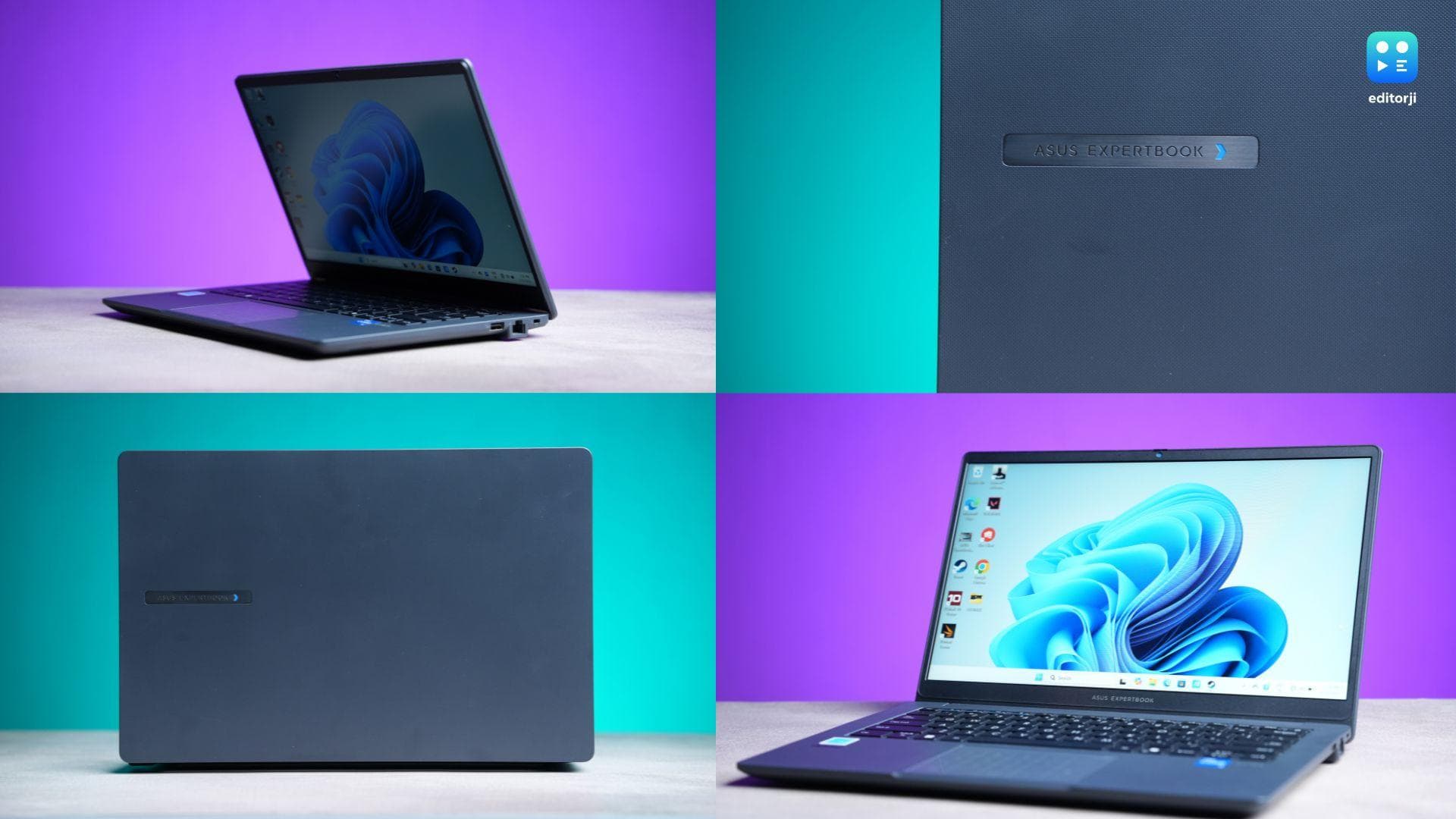
Let’s be honest, when you hear “business laptop under ₹40K,” you probably expect a chunky plastic box that groans under pressure. But Asus wants to challenge that image with the ExpertBook B1403, a military-tested, metal-clad, feature-packed machine that punches well above its price tag. And I’ve been using it in the wild: through Delhi metros, monsoon mishaps, and long editing sessions, to see if this thing can actually hold up.
Asus ExpertBook B1 Laptop Review: Design
This laptop isn’t just built for boardrooms; it’s built for battlefields. Not metaphorically; Asus put this thing through 24 different MIL-STD 810H tests. I’ve seen people stand on it, pour water on the keyboard, and yank at the ports like they're opening a stubborn packet of chips. And the laptop just… survives.
Even in real life, I threw it into my bag, jostled it through rush hour in Delhi, and used it in humid, rain-soaked cafes. Not a single creak or glitch. The metal chassis feels solid, the hinge is smooth yet firm, and the whole device weighs just about 1.5 kg and stays under 20mm thick. It’s compact without feeling fragile.
As far as ports are concerned, you are covered.. Dual USB-C (with PD and DisplayPort), dual USB-A, HDMI, audio jack, RJ45, and even a Kensington lock slot. Smartly, most of the ports sit on the left, giving your mouse hand the breathing room it deserves.
Asus ExpertBook B1 Laptop Review: Display
Let’s set expectations: this is a 14-inch 1080p anti-glare IPS panel, pushing 300 nits. Colour-wise, it’s 45% NTSC, so no, it’s not winning any awards for vibrancy. But for work, media, and the occasional Netflix binge on a flight? Absolutely fine.
And here’s the surprise — I played a few rounds of Valorant on this thing. Did it stutter and heat up a bit? Of course. But it ran. That speaks volumes about the Intel Core i5-13420H chip inside: an 8-core 13th Gen CPU with enough grunt for multitasking, light gaming, and even basic creative work.
Asus ExpertBook B1 Laptop Review: Performance
Pair that CPU with 16GB of RAM and a 512GB SSD, and you’ve got yourself a machine that can breeze through Chrome tabs, Zoom calls, spreadsheets, and video playback all at once. For business users or students, this is more than enough.
Benchmarks tell the same story; a Geekbench 6 single-core score of 1903 and a multi-core score of 6850 show the CPU can more than hold its own in day-to-day tasks. The GPU score of 9328 may not break any records, but it’s more than respectable for an integrated graphics setup. In Cinebench R23, it clocks in at 6411 on multi-core and 894 on single-core, reinforcing the fact that this machine is built for reliable, consistent productivity, not flashy peak performance. PCMark 10 returns a solid 4132, and 3DMark’s Night Raid lands at 11,394. Not mind-blowing, but perfectly competent for a non-gaming ultrabook. It may not turn heads on a benchmark leaderboard, but in real-world use, it gets the job done, and then some.
Asus ExpertBook B1 Laptop Review: Keyboard & trackpad
This is where the ExpertBook truly earns its name. The backlit, spill-resistant keyboard is smooth, tactile, and has a lovely 1.35mm key travel. You feel every press without straining your fingers. Asus even added a mylar layer under the keys to make it water-resistant up to 66cc. That’s just smart engineering.
The 180-degree hinge is perfect for collaborative work or typing in weird postures. And no, the keyboard doesn’t flex under pressure.
The trackpad was serviceable at best. It’s not the smoothest, but it’s well-sized and accurately placed, with no weird palm rejection issues.
Asus ExpertBook B1 Laptop Review: Thermals, fan noise, and battery life
Under normal workloads like browsing, docs, watching video, the machine stays cool and nearly silent. The fans don’t make a peep. Push it hard with benchmarks, and yes, it heats up a bit, but not uncomfortably so.
Battery life claims go up to 8 hours. In my usage, which was a mix of web browsing, working on MS Office, and video playback, I averaged around 5-6 hours. Throw in some benchmarks or light gaming, and expect 4 hours tops. It charges back in around 2 hours with the bundled 63Wh charger. Pretty solid overall.
Asus ExpertBook B1 Laptop Review: Audio & webcam
Here’s something I didn’t expect to praise: the speakers. Two smart amps push audio to 94dB good enough for video calls and casual binge-watching without needing headphones. And it’s surprisingly distortion-free, even at higher volumes.
The webcam is sharp enough for Zoom and Google Meet, and with Microsoft Studio Effects (via free update), you get software tricks like background blur, auto framing, and eye contact correction, all powered by on-device AI.
Asus ExpertBook B1 Laptop Review: Software, security & business-ready features
Asus isn’t just selling hardware here, the software suite is just as well-thought-out. The MyASUS and ExpertWidget apps make customisation easy, from fan profiles to charging modes.
Now, coming to security. You get practically everything that you can think of: a fingerprint scanner, optional IR camera with Windows Hello, webcam privacy shield, TPM 2.0 chip, USB access locks, BIOS rollback prevention — the works. IT admins can even manage fleets of these using the ASUS Control Center remotely.
There’s also AI-powered noise cancellation for mics, real-time translation, meeting summaries, and a transcription tool built into the OS-level ExpertMeet software. For a ₹30K-ish laptop, this is quite impressive.
Asus ExpertBook B1 Laptop Review: Verdict
The Asus ExpertBook B1403 isn’t flashy. It doesn’t have OLED panels or fancy haptics. But what it does have is everything a practical, on-the-move professional or student actually needs: durability, real-world performance, great I/O, thoughtful software, and smart design touches.
At around ₹30,000, this thing is an absolute steal, especially when you consider bulk purchase options for teams.
So who’s it for? Students, writers, field workers, office-goers, remote warriors, basically anyone who needs a no-nonsense, dependable workhorse that doesn’t crack under pressure. Just don’t expect buttery gaming or creative-grade display quality.
For the price though, this laptop doesn’t just pass the test: it sets the curve.