Highlights

  • Apple to release iOS 17.1 update.
  • iOS 17.1 release date is today.
  • iPhone 12 ban in France lifted post iOS 17.1 public release.
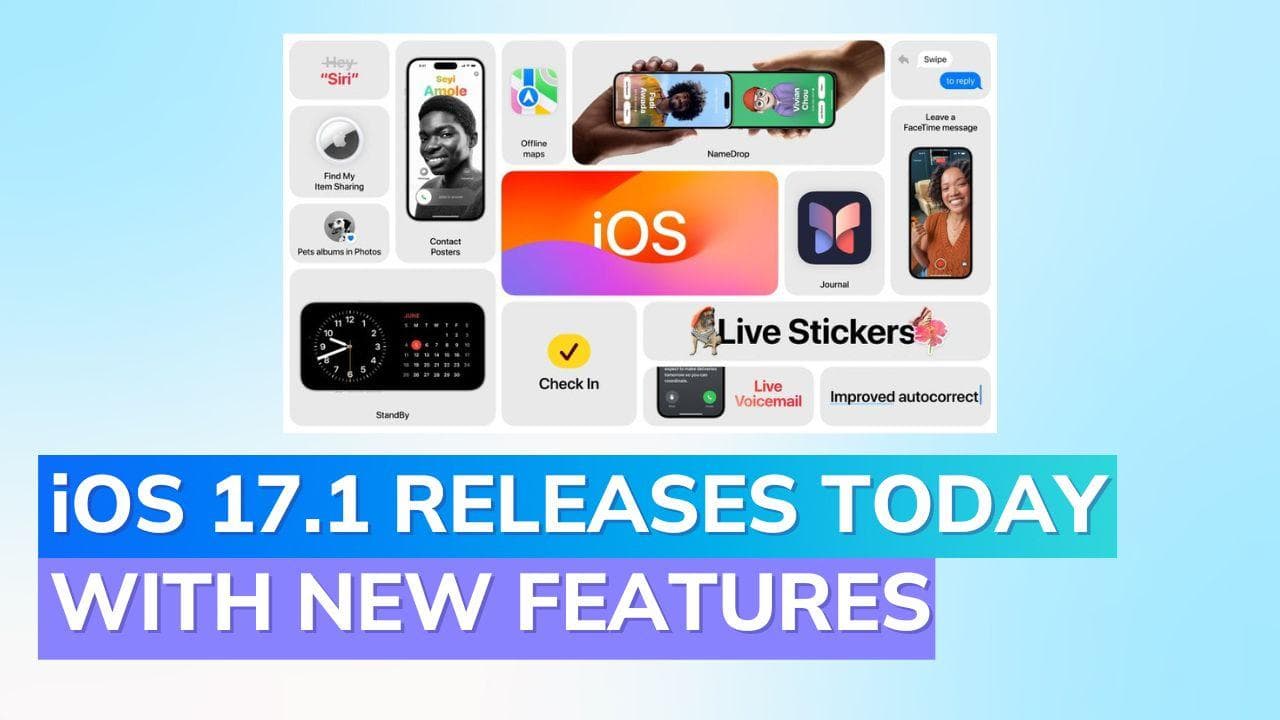
  • New features: Music App, AirDrop, Connected Cards, StandBy Mode tweaks.

Latest news

OnePlus 15R first look: OnePlus changes the R-series playbook

OnePlus 15R first look: OnePlus changes the R-series playbook

India's retail inflation rises to 0.71% in November

India's retail inflation rises to 0.71% in November

Cabinet approves CoalSETU window for auction of coal to boost industrial use and export

Cabinet approves CoalSETU window for auction of coal to boost industrial use and export

Cabinet approves Minimum Support Price for Copra for 2026 season

Cabinet approves Minimum Support Price for Copra for 2026 season

Fire never left: Vinesh Phogat comes out of retirement, targets LA Olympics

Fire never left: Vinesh Phogat comes out of retirement, targets LA Olympics

Flexible office segment in India set to grow faster, over 25% annually by 2027: Report

Flexible office segment in India set to grow faster, over 25% annually by 2027: Report

Rahul Gandhi flags issue of air pollution, seeks discussion in Lok Sabha

Rahul Gandhi flags issue of air pollution, seeks discussion in Lok Sabha

Japan lifts tsunami warning after magnitude 6.7 quake

Japan lifts tsunami warning after magnitude 6.7 quake

Apple iOS 17.1 release today: New features, supported iPhones, and step-by-step download guide

Apple's iOS 17.1 to launch with new features for Music app, AirDrop, and connected cards. Update guide and supported devices listed. iOS 17.1 Release follows iPhone 12's France ban due to radiation concerns.

Apple iOS 17.1 release today: New features, supported iPhones, and step-by-step download guide

Apple is set to introduce the iOS 17.1 update to its line of compatible iPhones, presenting a blend of novel features and significant bug fixes.

iOS 17.1 Release Date

The anticipated iOS 17.1 release date is today, indicating that compatible devices can expect to receive these new enhancements and adjustments promptly.

iPhone 12 France Ban

It's worth noting that the iPhone 12 France ban was enforced due to the device not meeting France's radiation exposure standards. This restriction will be lifted only when the iOS 17.1 version becomes publicly accessible.

Delving into iOS 17.1 New Features

A report from MacRumors has shed light on the array of iOS 17.1 new features that will be included:

iOS 17.1 Music App Improvements

The Music app is getting refined. Users can now affix a star icon to their favorite songs, albums, playlists, or artists. This not only enriches their library but also refines Apple's song recommendations.

iOS 17.1 AirDrop Improvements

A novel "Out of Range" feature is being added to AirDrop. This facilitates the transfer of files even when devices aren't nearby. If devices drift apart, the transfer will employ Wi-Fi or cellular data.

iOS 17.1 Connected Cards

For those in the UK, a distinctive feature will enable them to integrate their debit and credit cards from certain banks into the Wallet app. This integration lets users conveniently view recent transactions and card balances.

iOS 17.1 StandBy Mode Changes

Building upon the revelations made during the iOS 17 launch, there are tweaks to the StandBy Mode. Users can transform their iPhone into a smart display when it's being charged in landscape mode.

Yet, this feature targets only smartphones with iOS 17.1 always-on display support, such as iPhone 14 Pro and its counterparts.

iOS 17.1 Supported Devices

For those curious about iOS 17.1 supported devices, the list encompasses:

iPhone 15 Pro Max, iPhone 13 Pro Max, iPhone SE (2nd generation), iPhone 14 Pro Max, iPhone 11, iPhone 12 mini, iPhone 15, iPhone 13, iPhone XR, iPhone 14, iPhone 11 Pro Max, iPhone 15 Pro, iPhone 14 Pro, iPhone 12 Pro Max, iPhone SE (3rd generation), iPhone 13 Pro, iPhone 11 Pro, iPhone 14 Plus, iPhone XS Max, iPhone 15 Plus, iPhone XS, iPhone 12, and iPhone 12 Pro.

iOS 17.1 Download Guide

To seamlessly transition to this new update, follow the iOS 17.1 how to download steps:

1. Head to 'Settings' on your iPhone.

2. Venture into the 'Software Update' section under the 'General' tab.

3. Activate 'Automatic Updates'.

4. Opt for 'Download iOS Updates' and subsequently 'Install iOS Updates'.

Your device should now commence its update to Apple iOS 17.1.

Also watch: Massive iPhone 13 discount: A steal deal on Flipkart!

ADVERTISEMENT

Up Next

Apple iOS 17.1 release today: New features, supported iPhones, and step-by-step download guide

Apple iOS 17.1 release today: New features, supported iPhones, and step-by-step download guide

OnePlus 15R first look: OnePlus changes the R-series playbook

OnePlus 15R first look: OnePlus changes the R-series playbook

OnePlus Pad Go 2 First Look: Larger display, more polish, but does it work?

OnePlus Pad Go 2 First Look: Larger display, more polish, but does it work?

Realme Watch 5 Review: A budget smartwatch that gets the basics right

Realme Watch 5 Review: A budget smartwatch that gets the basics right

Realme P4x Review: Budget performer with a beast of a battery

Realme P4x Review: Budget performer with a beast of a battery

Nothing Phone 3a Community Edition ASMR Unboxing & First Look: For the fans, by the fans

Nothing Phone 3a Community Edition ASMR Unboxing & First Look: For the fans, by the fans

ADVERTISEMENT

editorji-whatsApp

More videos

Comic Con Delhi 2025: Sony PlayStation Leads the Floor

Comic Con Delhi 2025: Sony PlayStation Leads the Floor

OnePlus marks 12 years in India with a new six-star lineup for the 15R reveal

OnePlus marks 12 years in India with a new six-star lineup for the 15R reveal

Vivo X300 Pro Review: Pro-grade cameras, fantastic performance, but is it truly unbeatable?

Vivo X300 Pro Review: Pro-grade cameras, fantastic performance, but is it truly unbeatable?

Realme Watch 5 First Look: Inside the factory where It’s Made in India

Realme Watch 5 First Look: Inside the factory where It’s Made in India

Vivo X300 Review: Compact flagship, powerful performance, but what about the cameras?

Vivo X300 Review: Compact flagship, powerful performance, but what about the cameras?

Nothing Phone 3a Lite Review: Easy to like, but is it good value for money?

Nothing Phone 3a Lite Review: Easy to like, but is it good value for money?

iQOO 15 Review: A premium leap that finally puts iQOO in the top tier

iQOO 15 Review: A premium leap that finally puts iQOO in the top tier

Realme GT 8 Pro Dream Edition: Premium or Just Racing Paint? Full Review  

Realme GT 8 Pro Dream Edition: Premium or Just Racing Paint? Full Review  

Blaupunkt 65-inch Google Mini QD TV Review: The Surprise Package of 2025?

Blaupunkt 65-inch Google Mini QD TV Review: The Surprise Package of 2025?

Oppo Find X9 Pro Review: Massive Battery, Pro Cameras, Big Price — Worth It?

Oppo Find X9 Pro Review: Massive Battery, Pro Cameras, Big Price — Worth It?

Editorji Technologies Pvt. Ltd. © 2022 All Rights Reserved.