At first, the OnePlus Pad 4 comes across as a safe, almost predictable update. It sticks to the same fundamentals that worked earlier, including a large display, a clean design, and dependable performance. The upgrades are there, though. You get a newer chipset, a slightly bigger battery, and a stronger push toward productivity-focused use.
What makes it interesting is that none of these changes stand out instantly. In my experience, they start to show only after a few days. The tablet feels more consistent, and it handles longer, work-heavy sessions with more ease.
After using it for a few weeks, it settles into a routine that just works. I found it easy to rely on, and at times, I reached for it instead of my laptop.
That said, it is not without compromises, and those only become clear once you spend enough time living with it.
OnePlus Pad 4 Pricing in India: Strong value with launch offers
The OnePlus Pad 4 starts at ₹59,999 for the 8GB RAM and 256GB storage variant, while the 12GB RAM and 512GB option is priced at ₹64,999.
With bank offers and instant discounts of up to ₹5,000, the effective pricing becomes more appealing. The base variant drops to ₹54,999, while the higher-end 12GB+512GB model comes down to ₹59,999, which makes it easier to justify given the hardware on offer.
There is also a limited-period bundle that adds more value. OnePlus is including the Stylo Pro stylus, otherwise priced at ₹5,499, at no extra cost. If you plan to use the tablet for notes or sketching, that is a solid bonus.
On top of that, the folio case is available at ₹2,999 during the launch period. Overall, the pricing feels competitive, especially once you factor in the bundled extras.
OnePlus Pad 4 design: Familiar look, smarter tweaks
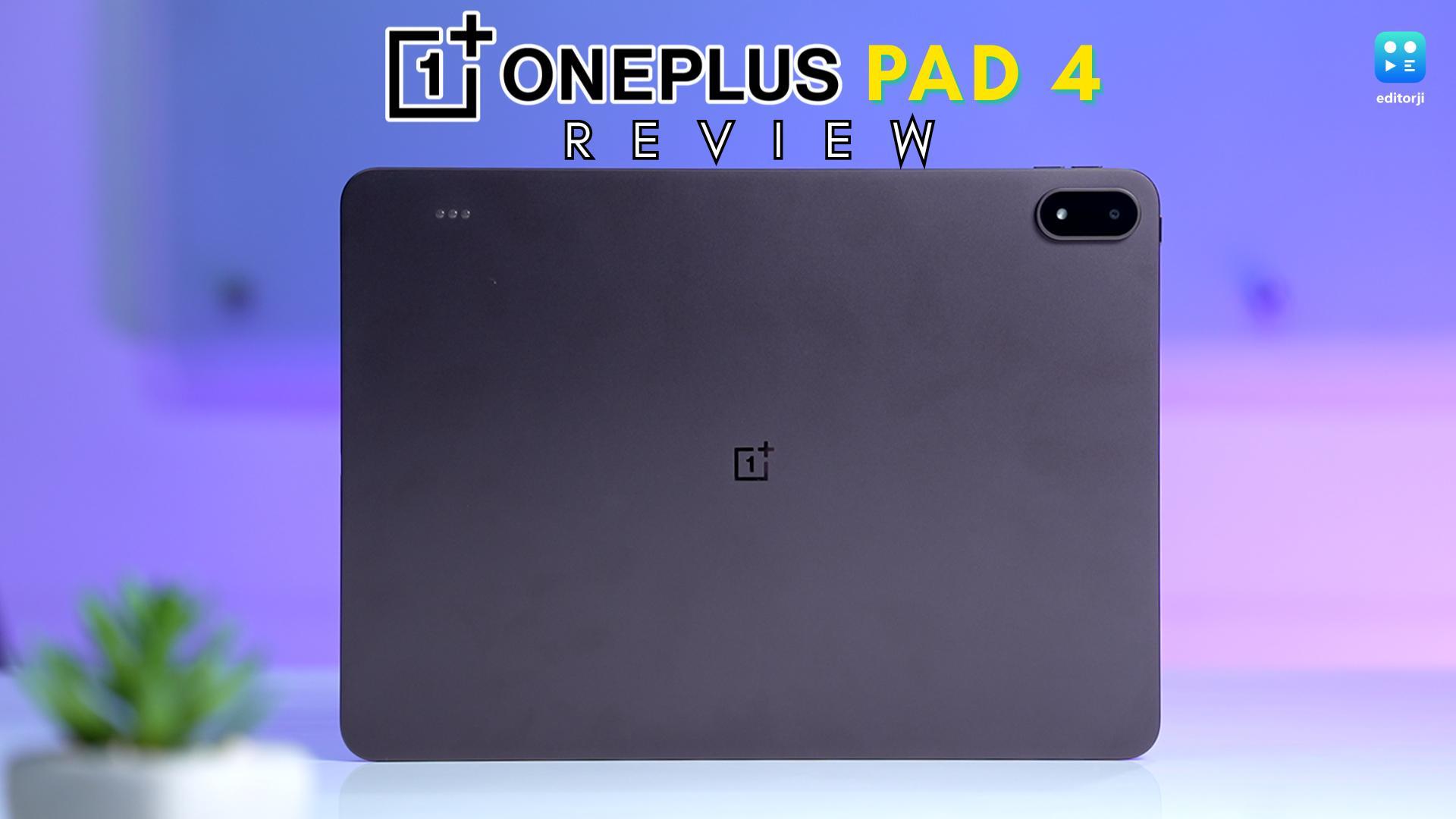
The OnePlus Pad 4 does not look very different from the Pad 3, but the changes here feel more considered than they initially appear.
It is slimmer at 5.94mm and weighs 672 grams, which, in daily use, makes it easier to carry around than you might expect from a tablet this size. I found it comfortable to move around with, whether I was using it at a desk or just holding it for longer sessions.
The metal unibody design stays clean and minimal. OnePlus has avoided adding unnecessary design elements, and I like how understated it feels. It looks premium without trying too hard to stand out.
That said, a few smaller changes do affect usability. The bezels are slightly thinner now, which improves the overall look, but also makes it a bit trickier to hold. I noticed that I had to be more mindful of my grip, especially when using it for extended periods.
There is also a practical shift with the pogo pins. They have been moved to the top edge, away from the camera module. It is a small change, but it alters how the keyboard connects and means older accessories are no longer compatible.
OnePlus Pad 4 display: Excellent, but playing it safe
The OnePlus Pad 4 sticks with a display setup that already worked well, and that decision defines the experience here.
You are looking at a 13.2-inch panel with a 3.4K resolution, backed by a 144Hz refresh rate, Dolby Vision support, and 12-bit colour processing. The 7:5 aspect ratio also carries forward, and I still find it one of the most practical layouts for a tablet, especially when you are switching between work and entertainment.
In actual use, it does not disappoint. Text looks crisp, animations feel smooth, and the size makes it comfortable for both content consumption and productivity. I found the aspect ratio particularly useful while multitasking, since it gives apps more breathing room.
Brightness has been nudged up to 1000 nits in high brightness mode. It helps outdoors, but the difference is subtle unless you are under strong sunlight.
Where it falls a bit short is ambition. At this price, I expected a move to AMOLED. This panel is still solid, but deeper blacks, stronger contrast, and better HDR would have made the upgrade feel more meaningful.
It feels reliable, just not new.
OnePlus Pad 4 performance: Faster and more consistent in practice
The biggest change with the OnePlus Pad 4 sits under the hood. It runs on the Snapdragon 8 Elite Gen 5, and on paper, that is a sizeable upgrade. OnePlus is claiming around a 42% jump in benchmark performance, with AnTuTu scores going past 4.1 million, along with gains in both CPU and GPU efficiency.
In real-world use, though, this is not the kind of upgrade that hits you instantly. The previous model was already quick enough for most tablet use cases. Apps opened without delay, multitasking felt fluid, and even heavier workloads rarely pushed it to its limits.
Where things start to shift is over time. The Pad 4 feels more consistent. Thanks to an improved cooling system and a larger vapour chamber, it is better at maintaining performance during longer sessions. I noticed that it holds its pace when juggling multiple apps or using it continuously, and it does not build up noticeable heat.
Memory and storage have also been refined. You get 8GB or 12GB of LPDDR5X RAM, paired with 256GB or 512GB of UFS 4.1 storage. The move to UFS 4.1 may seem minor, but it helps with quicker file transfers and smoother app loading over time.
Interestingly, the previous model went up to 16GB of RAM, but used UFS 4.0 storage. In practice, both feel fast, but the Pad 4 feels tuned for sustained performance rather than short bursts.
Connectivity stays mostly the same, with Wi-Fi 7 and USB 3.2 Gen 1 Type-C. The only real upgrade is Bluetooth 6.0 over Bluetooth 5.4. There is still no cellular option, though using it with a 5G hotspot worked reliably in my experience.
OnePlus Pad 4 audio: Reliable, immersive, and hard to fault
Audio remains a clear highlight on the OnePlus Pad 4, and OnePlus hasn’t tried to fix what wasn’t broken.
You still get an eight-speaker system, combining woofers and tweeters placed evenly on both sides. In use, the output feels rich and well-balanced, whether you are watching videos or just playing music in the background. It does not feel thin or uneven, which is often the case with tablets.
One thing that stood out to me is how well it adapts. The tablet adjusts its audio channels based on how you hold it, so the sound stays properly aligned even when you rotate it. It is a small touch, but it makes the experience feel more polished.
Volume is also more than enough to fill a room, and even at higher levels, the sound stays clean without turning harsh.
Overall, this is one area where OnePlus has simply maintained a strong baseline, and that works in its favour.
OnePlus Pad 4 cameras: Basic tools, nothing beyond that
Cameras on the OnePlus Pad 4 follow the usual tablet playbook.
You get a 13MP rear sensor and an 8MP front camera, and in my use, both handled everyday tasks without any fuss. They are dependable, but clearly not a focus area.
The rear camera works well enough for scanning documents or grabbing a quick shot when your phone is not nearby. The front camera is more relevant here, with support for 1080p video. I used it for calls and meetings, and it stayed consistent with no major issues.
Beyond that, there is not much to talk about. This is not a device meant for photography, and it does not try to be one.
Like most tablets, the cameras are simply there when you need them, and easy to forget about otherwise.
OnePlus Pad 4 software: Clearly built with productivity in mind
With the OnePlus Pad 4, the real change is not the hardware, it is the direction. OnePlus is clearly pushing this tablet toward getting actual work done.
It runs OxygenOS 16, and the experience leans heavily into multitasking. You can open multiple apps, resize windows more freely, and move between tasks in a way that feels closer to a lightweight desktop than a typical tablet. I found this especially noticeable during longer work sessions.
A big part of that comes from Open Canvas. It lets you place apps side by side and even extend them beyond the screen, so you can swipe between them instead of squeezing everything into one view. In practice, it feels more natural than standard split-screen and makes better use of the large display.
Multitasking overall is more flexible. You can have up to five apps open at once, depending on how you set things up, and switching between them stays smooth and predictable. It is not quite a full desktop replacement, but it gets closer than most Android tablets.
File handling has also improved. Drag-and-drop feels more reliable, and external storage support makes managing files less restrictive. It is still not perfect, but it is usable enough that I did not feel limited.
There is also tighter cross-device integration. You can use it as a second screen, and file transfers feel quicker and more seamless.
OnePlus has added AI tools like AI Writer and AI Summary, but in my use, they feel more like occasional helpers. The promise of three Android updates and four years of security patches does add some long-term confidence.
OnePlus Pad 4 battery: Slightly bigger, a bit more dependable
Battery is one area where the OnePlus Pad 4 makes a simpler improvement rather than a headline jump.
It now comes with a 13,380mAh battery, which is a step up from before. On paper, OnePlus talks about up to 20 hours of video playback along with longer standby times. In my usage, it comfortably handled a full day that included streaming, browsing, and some work without needing a top-up.
The upgrade is not dramatic, but it is easy to notice over time. Compared to the earlier model, this one feels a bit more relaxed with its battery behaviour. I found myself worrying less about plugging it in midway through the day.
Charging, however, stays unchanged. You still get 80W SUPERVOOC, and a full charge takes a little over 90 minutes. It is fast enough, just not faster than before.
Overall, this fits the tablet’s theme, a small but useful step forward in everyday reliability.
OnePlus Pad 4 accessories: Promising direction, but not fully there yet
Right now, the accessory ecosystem around the OnePlus Pad 4 feels like it is still coming together.
The Stylo Pro is the most complete piece right now, and it is a clear step up. With 16,000 levels of pressure sensitivity, it feels more accurate and natural, especially for writing or sketching. I also like that OnePlus has added interchangeable tips this time. They slightly change the feel depending on how you use it, which is something regular stylus users will appreciate.
Beyond that, things are still taking shape. OnePlus has confirmed a new keyboard, but there is no clear timeline yet, so it is not something you can really factor into your buying decision at the moment.
There is also a new folio case, though I did not get to try it with my unit, so I cannot comment on how it holds up in real use.
Right now, the intent is clear, but the full ecosystem does not feel fully in place yet.
OnePlus Pad 4 verdict: A polished upgrade that’s still evolving
The OnePlus Pad 4 is clearly a step ahead of the Pad 3, but it is not a dramatic shift.
Performance feels steadier over time, battery life stretches a bit further, and the overall experience comes across as more refined. At the same time, it does not fundamentally change how the tablet feels in everyday use. The display remains excellent but largely unchanged, and the design feels cleaner without being completely reworked. Much of what works here is built on an already solid foundation.
Where things feel slightly unfinished is with the accessories. OnePlus is clearly aiming for a more complete, laptop-style setup, but that vision is not fully realised yet. That puts the Pad 4 in an interesting spot as a strong, but somewhat transitional update.
If you are buying a tablet today, this is the more forward-looking option. It feels better aligned with where OnePlus is heading.
If you already own the Pad 3, though, the upgrade is not urgent.
What you get here is a more mature version of the same idea, one that prioritises consistency over quick impressions.