The Oppo Pad 5 is clearly designed to be an all-rounder. It is not trying to reinvent the tablet category or chase one dramatic headline feature. Instead, it positions itself as a balanced device that covers all the essentials without cutting obvious corners.
On paper, the spec sheet looks reassuring. You get a 12.1-inch 2.8K display with a 120Hz refresh rate, a MediaTek Dimensity 7300 Ultra processor, up to 8GB of LPDDR5X RAM and 256GB of UFS 3.1 storage, a large 10,050mAh battery, stylus support, quad speakers, and Dolby Vision. It reads like a checklist Oppo did not want to leave incomplete.
In India, the tablet starts at ₹26,999 for the Wi-Fi variant and ₹32,999 for the 5G model, which puts it in a competitive but important price bracket.
After spending a good two weeks with it as my choice of device aside from my phone, which meant using it as my streaming device, productivity companion, note-taking slab, and occasional gaming machine, I wanted to see whether this balanced approach actually works in real life. And I have to say, I was pleasantly surprised.
Oppo Pad 5 Review: Design and build quality
Let us start with the design, because with tablets, design is not just about looks. It is about how the thing feels after 40 minutes of Netflix, or two hours of note-taking.
The Oppo Pad 5 keeps things simple and controlled. The proportions are neat. The bezels are evenly balanced. The flat edges give it that modern, 2026 tablet vibe without trying too hard to look futuristic. It feels confident, but not loud.
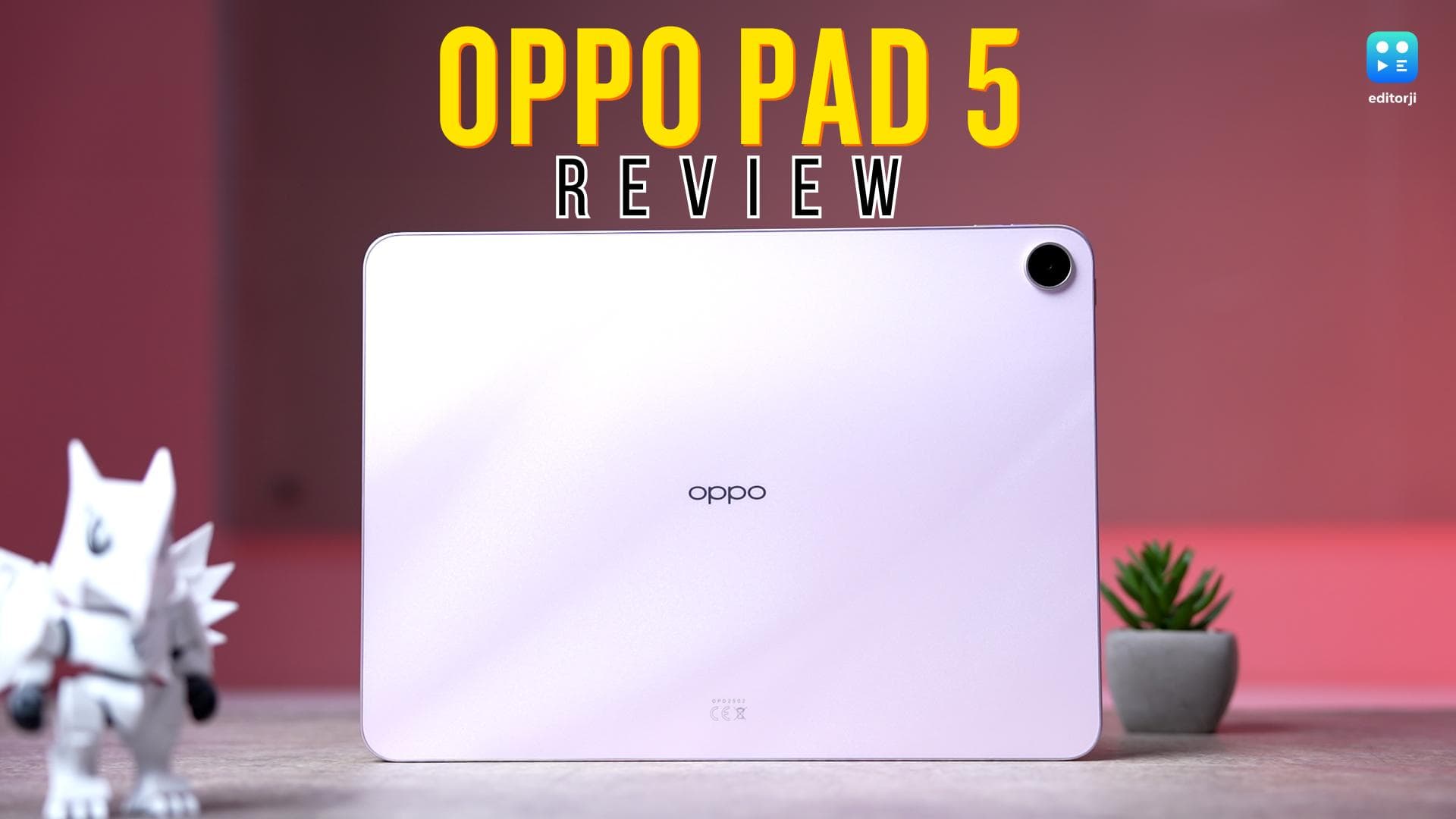
My unit came in Aurora Pink, and honestly, it looks better in person than in pictures. It has this soft mauve, marble-like finish that catches light in a subtle way. Indoors, when you tilt it slightly, you see this shimmery texture that adds depth. It does not scream for attention, but it definitely does not feel basic either. If pink is not your thing, there is a black version that keeps things clean and low-key.
The back is polycarbonate, but it does not feel cheap. There is no flex when you twist it. No hollow sound when you tap it. It feels dense and reassuring, which is what you want from something you will carry around daily. The frame looks metallic and feels sturdy. The flat edges make it comfortable to hold in landscape mode, especially while watching content. On a desk, it sits flat without wobbling, which sounds small, but it matters.
At around 6.8mm thick, it is slim enough to feel sleek without feeling fragile. The Wi-Fi variant weighs 597 grams, and the 5G version is 599 grams. That two-gram difference means nothing in real life. What matters is that it feels balanced. It is light enough for long reading sessions, but not so light that it feels toy-like.
The rear camera module is clean and minimal. There is a small decorative ring around the lens, which adds a bit of character without being flashy. For some strange reason, though, you don’t get a flash with the rear camera.
Now, I tested the Wi-Fi unit, so there’s no SIM tray here. If you want 5G, you will have to go for the 8GB + 256GB model.
As for accessories, the Pad 5 does support stylus input, and Oppo also sells a new stylus, the Oppo Pencil 2R, separately for the Pad 5. For this review, I used the OnePlus Stylo 2 instead, and it worked perfectly. Pressure sensitivity felt accurate, latency was low, and handwriting recognition worked smoothly. Even scribbled calculations were picked up correctly. So, if you want, you can use a third-party Bluetooth stylus without any issues.
Surprisingly, though, there is no dedicated folio cover for the Oppo Pad 5, not even from Oppo. However, you can use the folio cover from the OnePlus Pad Go 2, as they are almost identical in dimension.
Overall, the Pad 5 is comfortable, practical, and for a tablet you will use every day, truly dependable.
Oppo Pad 5 Review: 12.1-inch 2.8K display and quad speakers
Now let me talk about the display, because this is honestly where I felt the Oppo Pad 5 steps up.
It has a 12.1-inch 2.8K LCD panel with a 120Hz refresh rate, and the moment I unlocked it, it felt premium. This is technically a 12-bit, or 8+4-bit panel, and I could actually see the difference. Colours have depth instead of looking flat. In Vivid mode, it covers 98 per cent of DCI-P3, and in Natural mode, it hits 100 per cent sRGB. Gradients look smooth. Dark scenes do not show harsh banding. It feels refined.
Streaming was a good experience, too. I watched HDR content on YouTube and Netflix, and the panel held up well. Dolby Vision support is present, HEVC decoding works, and Netflix streams in Full HD without restrictions. At this price, I appreciate that nothing feels artificially capped.
The 120Hz refresh rate makes daily use feel fluid. Scrolling through long articles feels effortless. Swiping between apps is responsive. After using it for a few days, going back to 60Hz genuinely feels slower to me.
Brightness peaks at 900 nits in high brightness mode. Indoors, it looks excellent. Under shade outdoors, I had no issues. In direct harsh sunlight, it can struggle slightly, but that is expected in this segment.
I also like the 7:5 aspect ratio. It feels balanced for productivity, very similar to most iPads. Split-screen apps actually get enough space to be usable. Reading long documents feels natural and not strained.
The quad speakers surprised me. They get loud without distorting quickly. There is a hint of bass, dialogue is clear, and music does not sound thin.
For Netflix, YouTube, or even background music while working, I felt the multimedia experience was complete and well-sorted.
Oppo Pad 5 Review: 8MP Cameras that do the job
Let us be honest, nobody buys a tablet for its cameras, and the Oppo Pad 5 is no different.
On the back, you get an 8MP sensor. It is not trying to be artistic. It is there for practical stuff. Scanning documents works smoothly. Clicking whiteboard notes is quick and clear. Reference shots look sharp enough for everyday use.
The front is also 8MP, and in good lighting, it does the job well. Video calls look natural. Skin tones are balanced. Exposure is handled properly.
You are not buying this for selfies or to record videos of any previous moments. It is meant for your online classes and Zoom meetings, and in those specific use cases, it works just fine.
Oppo Pad 5 Review: Dimensity 7300 Ultra performance
The Oppo Pad 5 runs on the MediaTek Dimensity 7300 Ultra, paired with up to 8GB of LPDDR5X RAM and 256GB of UFS 3.1 storage. I tested the 8GB plus 256GB variant.
This is not a performance-first tablet on paper, but in daily use, I never felt like it was struggling to keep up.
In my testing, it scored just under 985,000 on AnTuTu. Geekbench returned 998 in single core and 3136 in multi core. On 3DMark, stability was an impressive 99.4 per cent, with loop scores sitting between 860 and 865. The numbers are respectable, but what mattered more to me was how consistent they felt.
From what I experienced, Oppo has tuned this device conservatively. It does not spike aggressively for short benchmark bursts. Instead, it focuses on sustained stability, and that shows in real-world usage.
I ran split-screen apps, floating windows, multiple Chrome tabs, background downloads, and YouTube playback at the same time. Everything remained smooth. App switching felt fluid, and I did not notice random frame drops.
Gaming performance is also pretty decent if you just want to enjoy a larger display. I tried games like BGMI, and it ran comfortably well. COD Mobile can hit up to 90FPS on low graphics, and gameplay was pretty stable. That 3DMark stability score actually reflects the experience I had.
While the Pad 5 may not be a tablet that is trying to top benchmark charts and gaming scores, it is a balanced, dependable performer built for everyday reliability.
Oppo Pad 5 Review: ColorOS 16 software experience
The Oppo Pad 5 runs on ColorOS 16 based on Android 16, and I have to say, it feels familiar in a good way.
The interface is clean and easy to understand. Nothing feels cluttered. There is a slight glassy look to parts of the UI, but it is subtle. It does not feel like it is trying too hard. I get the same customisation options that I have seen on recent Oppo and OnePlus phones, so if you have used one before, you will feel at home. The Flux theme is here as well, and I like how it matches app icons to the overall theme. It keeps everything looking neat.
This being 2026, there are a ton of AI features, but they do not feel forced. I tried AI summaries for text, and they worked fine for quick overviews. There are several AI photo editing tools built in, and Google Gemini support is integrated too. I did not feel like these were gimmicks, but I also did not feel like they were revolutionary. They are just useful additions.
Where I genuinely enjoyed the experience was multitasking. I used split screen a lot, and it ran smoothly. Floating windows were responsive. You also get a ton of cross-device features, which were easy to use in my testing. Phone mirroring worked consistently, and moving files between Android phones, iPhones, and even my PC felt intuitive and hassle-free.
Oppo says it will keep performance smooth for four years. For a tablet, long-term stability is important, and I appreciate that commitment.
Oppo Pad 5 Review: 10,050mAh battery and 33W charging
Battery life ended up being one of the most reassuring parts of my time with the Oppo Pad 5.
It packs a 10,050mAh battery, and in my usage, it comfortably lasted around a day and a half. That included streaming shows, browsing, taking notes, some light gaming, and a few video calls in between. I never felt anxious about the battery dipping too quickly, which is exactly what I want from a tablet.
The standby drain was low as well. When I left it idle overnight, the percentage barely moved, which tells me the optimisation is doing its job.
Charging is rated at 33W, and Oppo includes a 45W charger in the box. From low to full, it took me roughly an hour and a half. It is not class-leading fast, but it is practical and predictable.
For a tablet this size, the endurance feels stable and dependable, which honestly matters more than flashy charging speeds.
Oppo Pad 5 Review: Verdict
After spending two weeks with the Oppo Pad 5 as my go-to secondary device, I think Oppo has played this one smartly.
This is not a tablet that wins you over with one dramatic headline feature. It is not the fastest, not the flashiest, and not trying to redefine the category. What it does instead is quietly get almost everything right. The display is sharp, colour accurate, and genuinely enjoyable for streaming. The quad speakers add to that immersive feel. Performance is stable and consistent, whether I was multitasking, browsing, or playing games casually. Battery life is dependable enough that I never felt nervous stepping out without a charger.
Even the design, while not radical, feels practical and comfortable for long sessions, which matters more than bold aesthetics on a tablet.
At ₹26,999 for the Wi-Fi model and ₹32,999 for the 5G variant, I feel the Oppo Pad 5 offers a well-balanced package. If you want a tablet that can handle content consumption, productivity, note-taking, and some gaming without obvious compromises, this makes a strong case for itself. It is not trying to dominate one category. It is trying to be reliably good at all of them, and in my experience, it succeeds.