The tablet market in India has been largely polarized: you either buy an iPad for longevity, or a budget Android tablet for media consumption. But mid-range tablets that can handle work, study, and play without costing a kidney are finally starting to make sense, and the Realme Pad 3 5G fits right into that space.
After a bit of a hiatus following the Pad 2, Realme is back. I’ve been testing the device extensively to see if it lives up to its "productivity" claims. Spoiler alert: It’s surprisingly good at being a digital notebook, but it does have its quirks. Here is my detailed review.
Realme Pad 3: Unboxing, Design & Build
The unboxing experience here feels complete. You aren't just getting the slate; the box includes a proper 45W SuperVOOC charger, a sturdy 1-meter white USB-A to Type-C cablet, the usual paperwork and a SIM ejector tool.
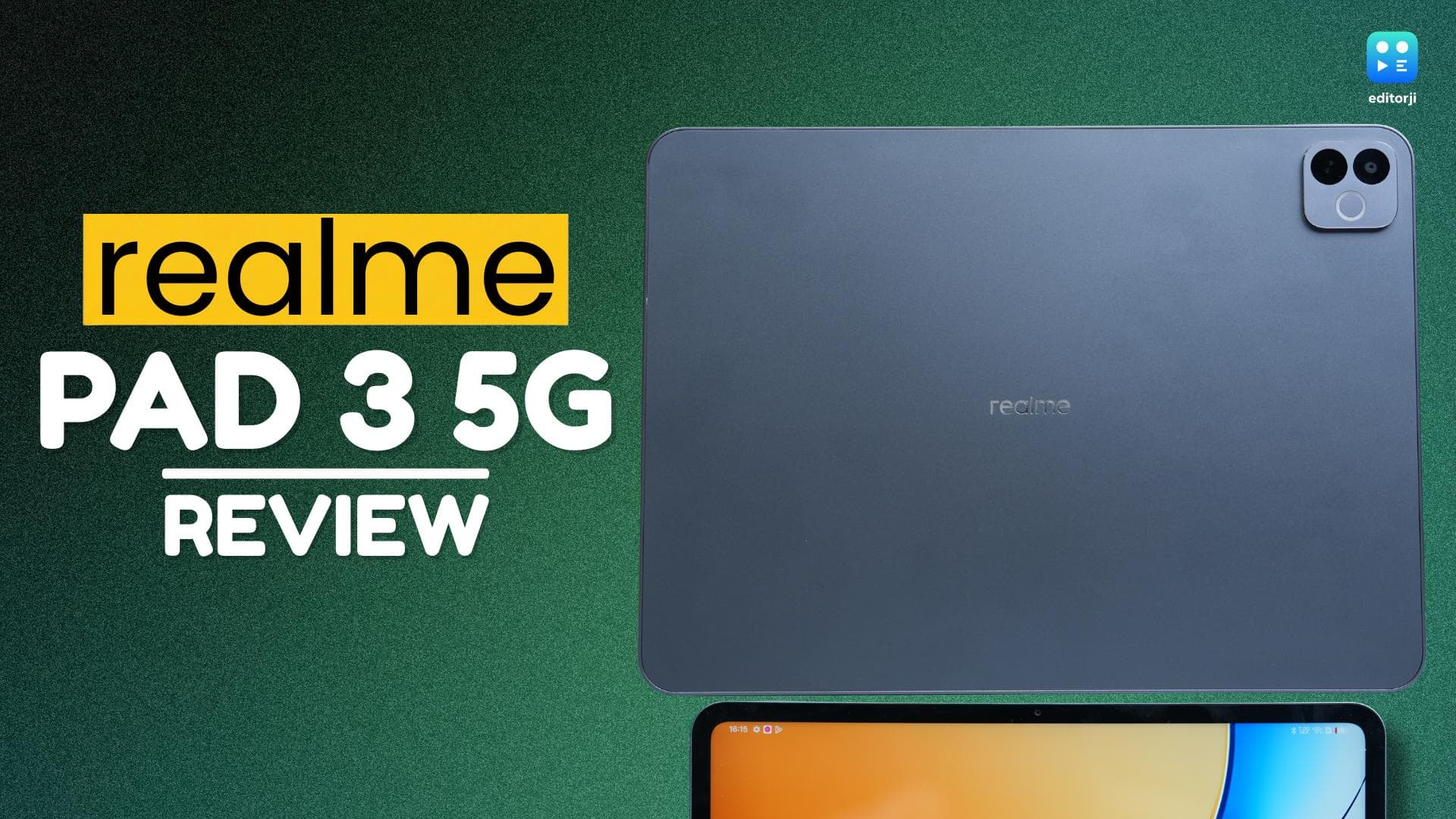
As for the tablet itself, I’ve been using the Space Grey unit (there’s also a Champagne Gold version), and it definitely leans more towards "business professional" than "flashy tech toy". It’s a clean, matte slab that feels reassuringly cold to the touch, thanks to the AL 5252 aluminum back. The finish is achieved through a mix of sandblasting and anodizing, which does a surprisingly good job of resisting the greasy smudges that usually plague dark-colored devices.
What really surprised me, though, was the weight distribution. On paper, it weighs about 578g , which sounds average for a tab, but because the chassis is so thin(just 6.6mm), the device feels dense and premium rather than heavy. It’s reinforced with a polycarbonate and aluminum alloy middle frame, making the whole thing feel rigid. I tried twisting it gently (don't ask why), and there was zero flex or creaking.
Holding the tablet in landscape mode is clearly how Realme intends you to use it as your hands naturally rest away from the quad speakers. Two are slotted on the left edge and two on the right, creating a loud, symmetrical soundstage. The power button sits on the top-left corner and doubles as a fingerprint scanner. It’s quick, though my muscle memory took a day to get used to reaching for it there.
The top edge houses the volume rockers and the microphone array. This is also where you’ll find the SIM tray. Just a heads-up for the power users: this is a single Nano-SIM slot, not a dual one. However, it does have a dedicated spot for a microSD card (up to 2TB), which is a massive bonus if you plan to carry around a library of 4K movies or massive design files. One omission that might bug the utility-focused crowd is the lack of an IR blaster; you can't use this tablet to control your AC or TV, which is a feature I’ve come to miss on devices that skip it.
On the front, you’re looking at an 11.6-inch screen wrapped in 6.88mm bezels. They are uniform on all sides and strike a nice balance thin enough to look modern, but thick enough to give your thumbs a place to rest without accidentally tapping the screen. The 8MP rear camera is tucked into a modest square bump that sits mostly flush, so if you’re typing on a flat desk, the wobble is barely noticeable.
Overall, the design doesn't try to reinvent the wheel, and it doesn't need to. It’s minimalist, practical, and feels built to survive a daily commute in a crowded backpack.
Realme Pad 3: Display
I didn’t expect the display to be the thing that stuck with me on the Realme Pad 3. Usually, tablet screens blur together after a point. This one didn’t, and it took me a couple of days to figure out why.
On the surface, everything looks predictable enough. It’s an 11.6-inch panel with a 2.8K resolution (2800 × 2000), and yes, it’s sharp. Text looks clean, icons don’t fray at the edges, and even when I pulled the tablet closer than I normally would, nothing broke visually. But after the initial “okay, that looks nice” moment passed, I realised that resolution wasn’t what I kept noticing while using it.
It was the shape of the screen.
Realme has gone with a 7:5 aspect ratio, which they brand as “Book View.” Ignore the name for a second. What matters is that it’s noticeably wider than the usual 16:10 layout most Android tablets stick to. And once you start using it for anything beyond video playback, the difference becomes hard to unsee.
I spend a lot of time reading scripts, scanning PDFs, and editing articles, and this is one of the rare tablets where those tasks didn’t feel compromised. There’s simply more room for text to breathe. I wasn’t zooming in every few minutes or constantly adjusting margins just to stay comfortable.
That extra width also helps when you split the screen. I ran Google Docs on one side and a browser on the other for a few sessions, and neither app felt like it was being punished for multitasking. Instead of two tall, awkward columns, both windows felt usable. Not perfect, but usable and which is more than I can say for most tablets in this range.
The display refreshes at up to 120Hz and switches dynamically depending on what you’re doing. In practice, it felt consistently smooth. Scrolling through menus, hopping between apps, or moving through a heavy YouTube feed never felt jerky or uneven. More importantly, I didn’t notice the kind of random stutters that sometimes show up when affordable hardware tries to juggle a high refresh rate.
Now, this is still an LCD panel, and that comes with trade-offs. If you’re used to AMOLED screens on your phone, you’ll spot the difference almost immediately. Colours are lively enough, Realme claims 96% NTSC coverage, and reds and blues do stand out, but blacks never fully disappear. They sit somewhere between dark grey and “almost black.”
That limitation shows up most clearly while watching darker content. I watched a few episodes of The Witcher, and in low-light scenes, the contrast just wasn’t strong enough to sell the mood. The black bars, which are thicker here because of the squarer screen, don’t fade away into the bezel either. They glow faintly. The tablet supports Widevine L1, so you do get full HD playback on Netflix and Prime Video, but there’s no HDR support. For casual viewing, it’s fine. For anyone who really cares about image depth, it’s not impressive.
Brightness is another area where the Pad 3 feels tuned more for indoor use. It sits around 500 nits normally and can stretch to about 550 nits when pushed. Inside a room, a classroom, or an office, it’s completely fine. I didn’t struggle there at all. Outside is a different story. I tried using it on a balcony, and once direct sunlight hit the screen, readability dropped quickly.
One thing I genuinely liked, though, was how easy it was on my eyes. I read a lot at night, and the combination of DC dimming and a hardware-level low blue light filter actually helped. I could sit with the tablet for a couple of hours before bed without that dry, tired feeling creeping in.
Realme Pad 3: Camera
Before I even start this section, it is well known that nobody’s buying a tablet for its photography chops. So, honestly nothing much to write here. The 8MP rear camera here is just fine for what it is. I found it useful enough for scanning documents or snapping a quick picture of a whiteboard in class. It focuses fast and the text comes out readable. That is really all you need it to do.
The front camera is where the real value is. Realme has placed the 8MP sensor on the longer edge of the display, which makes a big difference during video calls in landscape mode. So, during video calls, you look centered and more natural, instead of looking like you’re staring sideways. I took a few Google Meet calls on this, and the video was sharp. The dual microphones also did a solid job of cutting out background noise. It is a practical setup that works for meetings, not social media.
Realme Pad 3: Performance
The Realme Pad 3 is powered by the MediaTek Dimensity 7300-MAX. It is a 4nm chipset that attempts to balance raw power with battery life. My review unit arrived with 8GB of RAM and 256GB of storage.
I ran the standard benchmarks to get a baseline. On AnTuTu, the device hit around 970,000. In Geekbench 6, it scored around 992 in single-core and near 2,958 in multi-core. These are good figures for this segment. But synthetic tests only tell you so much.
In actual use, the tablet feels responsive. Apps launch fast and I could keep five or six apps active in the background without the system killing them aggressively.
Gaming was a genuine surprise. Both Call of Duty Mobile and BGMI ran smoothly and hit 90 FPS. I played for a solid two hours to test the thermals. The management here is excellent. The back of the tablet barely warmed up and the temperature mark never crossed 30 degrees. The cold weather might be a factor, but the device stayed incredibly cool.
For work, I tried editing clips in CapCut. Scrubbing through 1080p footage was smooth. But when I loaded a 4K timeline, I noticed lag during playback. It handles the basics well. Just don't expect it to replace a powerful workstation for creative tasks.
Realme Pad 3: Software & AI
Software is often where mid-range tablets stumble. This one is different. It runs realme UI 7.0 on top of Android 16 straight out of the box. The interface feels grown-up and fluid. It really uses that high refresh rate well. I was happy to see Realme show some restraint with pre-installed apps. There is almost no bloatware here. You get the essential Google and Realme tools. You won't have to spend several minutes cleaning up junk games.
Productivity is a big reason to buy a tablet today, and the Pad 3 delivers with genuinely useful AI features. “AI for Pad” includes AI Documents for quick PDF summaries, AI Recording Summary for meeting notes (it misses a few words sometimes, but gets the gist), and Circle to Search for instant lookups. If you use a Realme phone, Cross-Device Sync is seamless too, letting you copy on your phone and paste on the tablet instantly. Overall, the software feels smooth, well-optimised, and refreshingly free of bloatware.
Realme Pad 3: Battery and Charging
This is the “Titan” in the room. The 12,200mAh battery is phenomenal. In my testing, the endurance was genuinely impressive. I fully charged the tablet five days ago and haven’t needed to plug it in since (it’s still at 21%). That includes a solid day and a half of heavy use, where I streamed a cricket match and watched loads of movies.
I even spent my entire weekend binging Quentin Tarantino’s classic filmography. By the way, I absolutely love his work, and if you haven’t watched his films, you definitely should. And yes, I still think Reservoir Dogs is better than Pulp Fiction. Yeah, I went there. Through all that media consumption, I never once felt the usual battery anxiety.
When you do finally need to plug in, the charging speed is decent. It supports 45W charging. I wouldn't exactly call it "fast" by smartphone standards because it takes close to two hours to go from zero to one hundred percent. However, considering you are filling up such a massive cell, that is pretty considerable.
Another feature I found useful is the reverse charging. It provides a 10W of reverse charging and you can actually use the tablet as a massive power bank to charge your phone or earbuds in a pinch, which adds a lot of practical value.
Realme Pad 3: Should You Buy It?
The Realme Pad 3 5G is not pretending to be an iPad killer. It is simply one of the most sensible Android tablets I have used this year. If your day revolves around reading PDFs, researching, or typing away at documents, this device is an easy recommendation. The 7:5 screen shape makes a massive difference for actual productivity, and the battery life is just ridiculous.
I spent my time with the 8GB + 256GB 5G version, which comes in at ₹31,999. If you do not need the cellular connectivity, the Wi-Fi model starts cheaper at ₹26,999. Sure, the LCD panel won't give you those perfect inky blacks for late-night movie marathons. But for students or professionals who need a reliable machine that does not cost a fortune, this is the one to buy.