Budget gaming monitors are a dime a dozen right now, but in my book, most of them are not real gaming monitors. They usually top out at 165Hz or 180Hz, and even when they do hit those numbers, the compromises show up instantly. Poor response times, washed-out colours, inconsistent overdrive tuning. On paper they look fast, but in actual gameplay, they fall apart.
The Lenovo Legion 27Q10 does not follow that script.
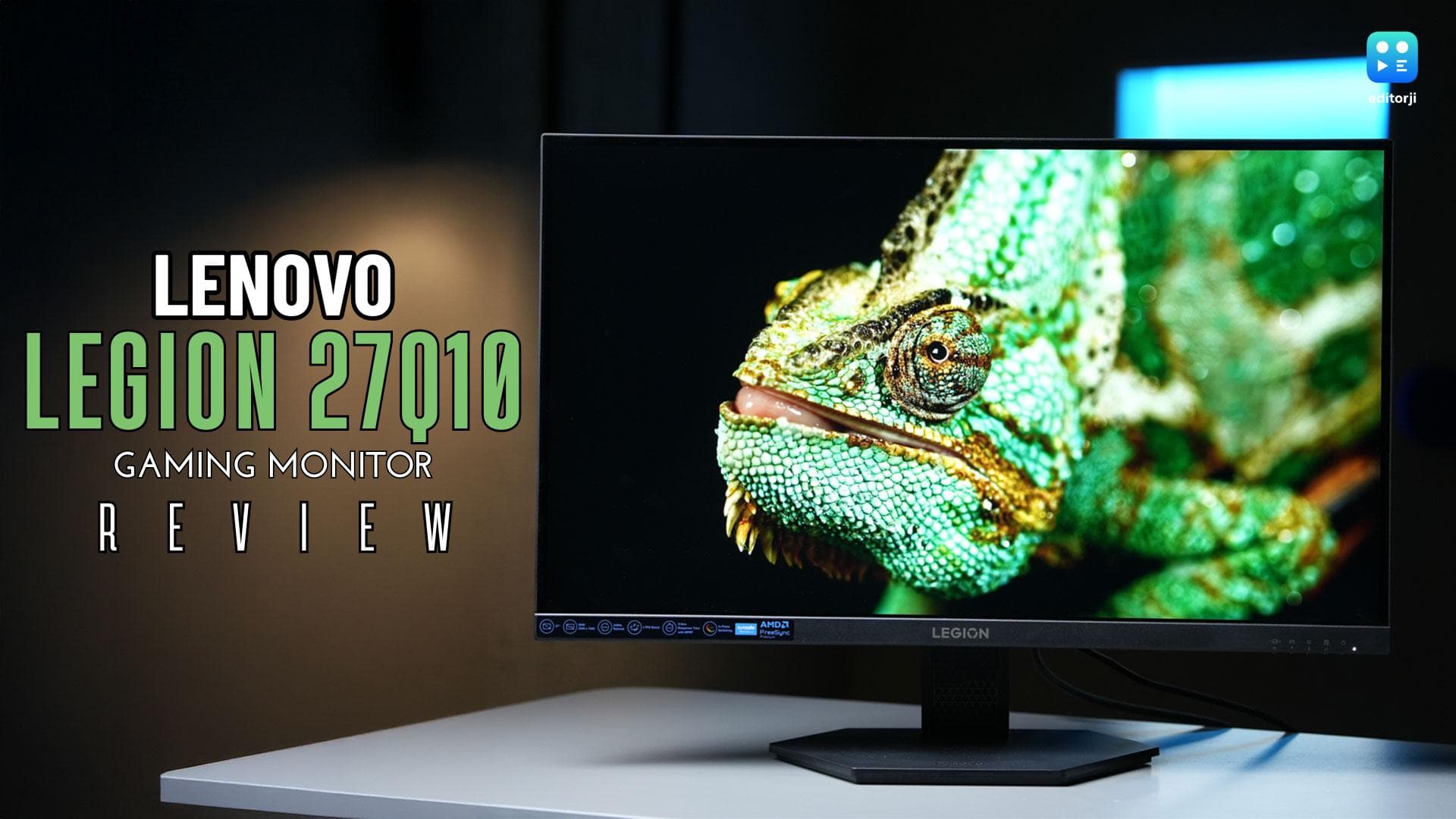
Ignore the convoluted naming for a second, because what Lenovo has done here is genuinely impressive. The Legion 27Q10 is one of the most hardcore gaming monitors you can buy for under ₹20,000, and yet it looks stealthy enough to blend into an office setup without drawing attention. No RGB. No flashy curves. Just raw performance packed into a surprisingly understated design.
I have been using the 27Q10 as my primary monitor for gaming, work, and media consumption, and this is one of those rare budget products that feels far more expensive than it actually is.
Design and setup: understated, functional, and refreshingly mature
Setting up the Legion 27Q10 is a straightforward, no-nonsense process. Inside the box, you get a large hexagonal base, a VESA-mounted arm, a full-size DisplayPort cable, and the power cable. Everything you need to get started is included, and Lenovo deserves credit for not cutting corners here.
The arm attaches to the monitor using four thumb screws that are included in the box. It is quick, tool-free, and sturdy. More importantly, because the monitor uses a standard VESA mount, you are not forced to use Lenovo’s stand at all. If you already have a monitor arm or want to free up desk space, you can mount it however you like without any fuss.
Design-wise, there is something brutally simple about the Legion 27Q10 that I genuinely love. This is a flat panel with a flat design through and through. No curves on the front. No curves on the back. Despite being a gaming monitor, it would not look out of place on an office desk or a creator workstation.
This is not a thin monitor by any stretch, and Lenovo is not trying to pretend that it is. Around the back, there is a protruding strip that houses the ports, ventilation cut-outs, and mounting points. It gives the monitor a slightly industrial feel, but nothing excessive.
Even though the monitor clearly belongs to Lenovo’s Legion gaming lineup, there is zero RGB lighting here. Personally, I prefer it this way. It keeps the setup clean and avoids that overdone gamer aesthetic that a lot of monitors in this category lean into.
The stand itself has a neat cable-routing cut-out that makes managing cables much easier. It is a small detail, but one that makes a real difference once everything is connected.
In terms of ergonomics, the Legion 27Q10 is excellent. You get tilt, swivel, height adjustment, and even pivot support. You can rotate the monitor vertically if you want to use it for coding, reading, or productivity workflows, which is a nice bonus at this price.
From the front, the monitor looks mostly edge-less, although there is a thicker bottom chin that houses the Legion logo. Branding elsewhere is minimal, which again fits the understated theme. The side and top bezels are thin, though not invisible. That is pretty standard for gaming monitors in this segment.
I do wish Lenovo had gone with a joystick-style control for the OSD instead of physical buttons at the bottom right. The buttons are clearly labelled, but navigating menus with them is still slower than it needs to be.
Thankfully, Lenovo’s Artery software exists. Once installed, you can bypass the on-screen display entirely and control settings directly from your PC. It is intuitive, functional, and genuinely useful.
Overall, the Legion 27Q10 scores very well in design. It is minimal, practical, and well-thought-out, especially if you want something that does not scream “gaming monitor” the moment you walk into the room.
Ports and connectivity: functional, but conservative
Port selection on the Legion 27Q10 is functional but conservative. You get two HDMI 2.1 ports, one DisplayPort 1.4, a three-pronged power connector, a 3.5mm audio out, and a Kensington lock slot.
If you want to unlock the monitor’s full potential, meaning the full 240Hz refresh rate and the fastest response times, you should absolutely connect it using DisplayPort. That is the only way to get everything this panel has to offer.
If you are planning to use the monitor with a Mac, PlayStation 5, or Xbox, the HDMI ports work just fine, but you will be limited to 144Hz. That is still perfectly usable, but it is worth keeping in mind.
For the price, the port selection is acceptable, but I do wish Lenovo had pushed things a little further. A USB-C port with DisplayPort support or even a couple of USB-A ports for accessories would have elevated this monitor significantly.
There are also no built-in speakers here, which is not surprising but still worth noting. You will need external speakers or headphones.
Display and panel performance: where the 27Q10 truly shines
This is where the Legion 27Q10 really starts to shine.
You are looking at a 27-inch IPS LCD panel with a QHD resolution of 2560 x 1440. For this screen size, that resolution is spot on. Everything looks sharp, crisp, and well-defined.
Text clarity is excellent, whether you are reading articles, writing documents, or coding. Media consumption looks great, and games benefit massively from the extra sharpness over Full HD.
Lenovo rates the panel at a typical brightness of 300 nits, which is slightly higher than what many monitors in this price range offer. I did not test peak brightness formally, but in a well-lit room, the screen had no trouble staying bright and legible.
The headline feature here is the 240Hz refresh rate, which makes a massive difference in fast-paced competitive games like CS:GO and Valorant. Motion looks fluid, tracking feels more precise, and once you get used to it, it is very hard to go back to lower refresh rates.
The monitor supports AMD FreeSync Premium and VESA Adaptive Sync, which helps eliminate screen tearing and stutter when paired with a compatible GPU.
Lenovo also includes multiple MPRT modes that can push the pixel response time down to as low as 0.5ms. For a monitor under ₹20,000, that is seriously impressive. Ghosting is minimal, motion clarity is strong, and fast transitions hold up extremely well.
Colour performance is another area where the Legion 27Q10 overdelivers. Even though this is an 8-bit panel, it covers 99 percent of the sRGB colour space and around 90 percent of DCI-P3. For a high-refresh-rate gaming monitor, that is borderline ridiculous.
Out of the box, the monitor comes factory calibrated, and Lenovo claims a colour accuracy of Delta E less than 2. In practical terms, this means you can start using it for colour-sensitive tasks like photo or video editing without immediately needing calibration.
Viewing angles are excellent, thanks to the IPS panel. Lenovo rates them at 178 degrees, and in real-world use, colours and contrast remain consistent even when viewing the screen from the side. This makes the monitor great for shared gaming sessions or couch gaming with a console.
Verdict: a benchmark for budget gaming monitors
At ₹19,999, the Lenovo Legion 27Q10 is an incredibly compelling purchase.
It quietly proves that budget gaming monitors do not have to feel compromised. You get a sharp QHD IPS panel, a genuinely useful 240Hz refresh rate, fast response times, and colour performance that comfortably punches above its price bracket.
Yes, there are alternatives from Samsung and LG at similar prices, but they all make compromises somewhere. Some settle for lower refresh rates. Others sacrifice colour performance. None of them hit the same balance that the Legion 27Q10 manages to achieve.
What really stands out is how well-rounded the package feels. This is not a monitor built purely to look good on a spec sheet. It works just as well for competitive gaming as it does for everyday productivity and light content creation.
The minimal design, excellent ergonomics, and VESA flexibility make it easy to fit into almost any setup. The port selection could have been more ambitious, and the lack of USB connectivity or speakers does sting a little, but these are not deal-breakers.
If you want a serious gaming monitor under ₹20,000 that does not scream gamer and still delivers top-tier fundamentals where it actually matters, the Lenovo Legion 27Q10 is easily one of the strongest value-for-money options in its class.