


Highlights
- Familiar design, now more comfortable
- Excellent display with Privacy Display
- Flagship performance, smooth everyday use
- Cameras improved, not a big hardware jump
- Strong battery, faster charging
- Expensive, but very polished overall
Latest news
Samsung Galaxy S26 FE Review: Samsung Gets Most Things Right
Asus Wireless Mouse MD105 Review: Comfortable Mouse for Everyday Work
Redmi Note 17 Pro Review: Great Battery Life Meets a Brilliant Display

ASUS Vivobooks Add Intel-Powered Flip Laptops, Snapdragon Battery Champs And AMD Power
POCO X8 Power Review: The 10,000mAh Battery Phone Done Right
Samsung Galaxy S26 FE Launched in India at Rs 79,999 With Exynos 2500 and One UI 9

vivo Buds Review: The Budget Earbuds I’d Actually Trust for a Full Workweek

Infinix HOT 70 Pro 5G Review: Big Battery, Distinct Design, But Is It Worth It?
Samsung Galaxy S26 Ultra Review: Pros, Cons & Real-World Test
Familiar on the surface, the Galaxy S26 Ultra focuses on refinement. You get a great display with Privacy Display, top-tier performance, improved cameras, and solid battery life—making it a very polished, if expensive, flagship.


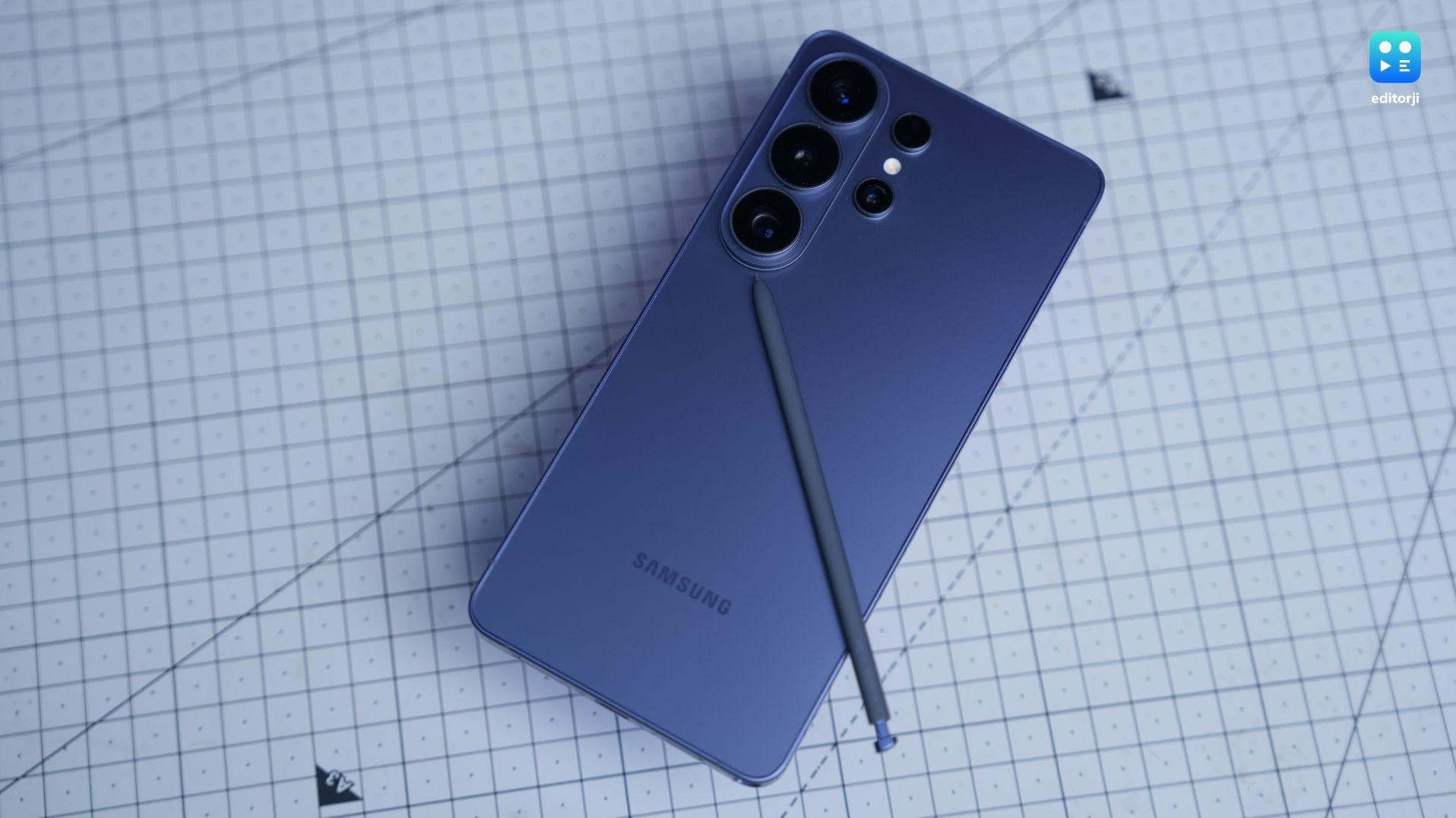
| 6.9-inch Dynamic AMOLED 2X | Snapdragon 8 Elite Gen 5 for Galax | 200MP main sensor 50MP 5x telephoto 10MP 3x telephoto 50MP ultra-wide |
5000mAh battery/60W Wired Charging |
| Android 16/One UI 8.5 | RAM: 12GB / 16GB Storage: 256GB / 512GB / 1TB |
Stereo speakers | S Pen support |
- Great display with Privacy Display
- Fast, smooth performance
- Reliable cameras and battery
- Very similar to last gen
- Expensive
- No Qi2 magnets
The Samsung Galaxy S26 Ultra hasn’t exactly had the smoothest reception since launch. A lot of the early reactions have been… mixed. And if you just glance at the spec sheet, it’s not hard to understand why.
On paper, this doesn’t look like a huge upgrade. The camera hardware is largely the same as last year, the battery capacity hasn’t increased at all, and the overall design is still very familiar territory.
At the same time, other brands are pushing ahead with bigger jumps in areas like battery technology and camera hardware, which makes Samsung’s approach here feel a bit conservative.
But after spending some time with the phone, I realised there’s actually quite a lot going on here beneath the surface. Samsung has introduced a genuinely interesting new display feature with Privacy Display, added some very clever improvements to the camera software, and doubled down on its growing suite of AI-powered features.
The result is a phone that doesn’t try to impress you with flashy changes. Instead, it feels like Samsung has quietly refined almost every part of the experience. And once you start noticing those refinements, the S26 Ultra begins to feel surprisingly complete.
So while it may not hit you over the head with massive upgrades this year, it’s quietly shaping up to be one of the most polished Ultra phones Samsung has made in years.
Yeah, brace yourselves. This is going to be a pretty positive review.
Samsung Galaxy S26 Ultra Design
When I first picked up the Galaxy S26 Ultra, one thing became clear almost immediately: Samsung really likes this design. And to be fair, it’s been sticking with it for quite a while now. The Ultra series hasn’t seen a major visual shake-up in a few generations, and the S26 Ultra continues very much in that same direction.
The moment you take it out of the box, it looks exactly like what you’d expect a Galaxy Ultra phone to look like. The massive display up front, the big camera lenses sitting on the back, the boxy aesthetic… it’s a design language Samsung has clearly settled into.
And honestly, I get it. The Ultra has become one of the most recognisable flagship designs out there. Pick it up, and it immediately feels like Samsung’s top-tier phone.
That said, because Samsung hasn’t really changed this design in a while, a small part of me was hoping for at least a tiny facelift this year. Nothing dramatic, just something that instantly signals, “this is the new one.”
But as I spent more time with the phone, I started noticing the small adjustments Samsung has quietly made to the design. The first one is the corners. Previous Ultra phones had these very sharp edges that made the device feel a bit like it had been carved out of a metal block. It looked cool, but it could also feel a little aggressive in the hand.
The S26 Ultra softens things up. The corners are more rounded now, and the overall shape feels less severe.
At first, I wasn’t sure how I felt about it. Those sharp corners were kind of the Ultra’s signature. You could spot them instantly. Now the phone blends in a little more with the rest of the S26 lineup.
But after using it for a few days, the reason for the change became obvious. The moment I held the phone sideways to watch a video or play a game, it felt much more comfortable. The older design had a tendency to dig into your palm during longer sessions. This one doesn’t. It’s still a big phone, but it’s noticeably easier to hold.
Samsung has also slightly changed the camera layout. Instead of each lens sticking out individually from the back, the main cameras now sit together on a raised island.
Visually, I actually quite like it. It looks cleaner and a bit more unified.
The downside, however, appears the moment you place the phone on a table. It wobbles.
Tap the screen while the phone is lying flat and it rocks back and forth quite a bit. It’s the sort of thing that quickly makes you reach for a case.
Another interesting change this year is the frame. Samsung has quietly moved away from titanium and gone back to Armor Aluminium. On paper, that sounds like a downgrade, because titanium sounds expensive and futuristic.
In reality? I couldn’t tell the difference.
The phone still feels extremely solid and premium. If Samsung hadn’t mentioned the material change, I probably wouldn’t have noticed. My guess is that the switch has more to do with things like heat management that users will feel day-to-day.
The rest of the build quality is exactly what you’d expect from Samsung’s flagship. The front is protected by Gorilla Armor glass with an anti-reflective coating that genuinely makes the display easier to see under bright lights. The back uses a matte Gorilla Glass finish that looks great and thankfully doesn’t turn into a fingerprint magnet.
Samsung has also trimmed the phone slightly this year. The S26 Ultra is a little thinner and a little lighter than before. It’s not a dramatic difference, but with a phone this large, even small reductions in weight make it easier to live with.
And I have to mention the colour of my review unit. I’ve been using the Cobalt Violet version, and it’s genuinely beautiful. Depending on the lighting, it shifts between a silvery tone and a deep purple. In a world where most flagship phones come in fifty shades of grey, it’s refreshing to see something with a bit of personality.
Samsung Galaxy S26 Ultra Display
The display on the Galaxy S26 Ultra is one of those things where, on paper, it almost looks like Samsung didn’t do anything at all. It’s still a 6.9-inch AMOLED panel, still runs at 120Hz, still hits around 2600 nits of brightness, and still pushes that super sharp QHD+ resolution. Basically, if you’re someone who loves looking at spec sheets, hoping for a big new number every year, you might be a tad disappointed.
But Samsung’s upgrade this year isn’t really about the specs. It’s about a new feature layered on top of the screen.
Samsung calls it Privacy Display.
The basic idea is simple. When I turn it on, the screen becomes very difficult to see from the sides. If I’m looking straight at the phone, everything looks normal. But if someone next to me tries to peek at the screen from an angle, the display starts fading out and eventually looks almost grey or black.
I tried it on the Metro, in a café, and even just sitting next to someone on a couch, and it actually works pretty well. If you move even a little off-axis, the screen quickly becomes hard to read. It’s basically a built-in version of those privacy screen protectors people used to buy separately.
The way Samsung does it is pretty clever. The display is designed with two kinds of sub-pixels that behave slightly differently. Some of them spread light out like a typical smartphone screen, while others are tuned to push the light straight forward. When Privacy Display kicks in, the phone leans more heavily on those forward-facing pixels, making the screen hard to see from the sides.
Of course, there’s a bit of a trade-off here. Since the screen isn’t using all of its pixels when privacy mode is active, the resolution technically drops a little, and the display can get slightly dimmer.
In the normal privacy mode, I honestly didn’t notice much of a difference. If I looked really closely, maybe the screen looked a tiny bit softer, but nothing that bothered me. But Samsung also includes something called Maximum Privacy, and that one definitely pushes things further.
When I turned that on, the screen got noticeably dimmer, and the colours looked a bit flatter. It still worked fine, but it definitely didn’t look like the gorgeous Samsung display I’m used to. I tried using it for a while and quickly realised it’s probably not something I’d want enabled all the time.
Where the feature really started making sense for me was when I stopped trying to leave it on all the time. Samsung actually lets you automate it, which is a much smarter approach. I set my phone so Privacy Display automatically turns on whenever I open banking apps or when password fields appear. You can also enable it for notifications or specific apps.
Once I set it up like that, the feature basically disappeared into the background. I forgot it was there most of the time, but it quietly kicked in whenever I was doing something sensitive. That’s probably the best way to use it.
Outside of the privacy trick, the display itself is still classic Samsung. Which is to say it’s really good.
It’s big, it’s bright, it’s ridiculously sharp, and the colours have that slightly punchy Samsung look that makes everything pop. Watching videos on this screen still feels great, and scrolling around the UI is super smooth thanks to the 120Hz refresh rate.
One thing I always appreciate on Samsung’s Ultra phones is the anti-reflective coating on the display glass. It sounds like a small thing, but it genuinely helps. When I’m outside or under bright lights, reflections are noticeably reduced compared to most phones. Once you get used to it, regular glossy screens actually feel a bit more annoying.
Samsung has also improved its ProScaler processing, which basically tries to upscale lower-resolution content and make it look sharper on the high-resolution display. It’s not something I was constantly noticing, but when watching older videos or lower-res clips, things did seem to look a little cleaner than expected.
The speakers are also really solid, which is something I’ve come to expect from Samsung’s Ultra phones. The stereo setup gets loud, voices sound clear, and there’s actually a bit of bass there, which is something a lot of phone speakers struggle with.
Watching YouTube or Netflix without headphones feels surprisingly immersive because the sound has some depth to it instead of that thin, tinny sound you sometimes get from smaller phones.
Samsung Galaxy S26 Ultra S Pen
There was one moment during my time with the Galaxy S26 Ultra that made me pause for a second. After using the phone for several hours, it suddenly hit me… wait, this phone has a stylus.
And I think that realisation says quite a lot about where the S Pen sits today.
Over the course of testing the phone, I probably pulled the stylus out only a handful of times. Once to quickly jot down a note, another time to sign a document, and maybe once more just to remind myself it was still there. The rest of the time, it stayed tucked away inside the phone.
That doesn’t mean the S Pen isn’t useful. It absolutely is. But it feels increasingly like a very specific tool for a very specific type of user. If you’re someone who loves writing notes by hand, sketching ideas, marking up documents, or doing precise photo edits, the S Pen is fantastic. Those people genuinely get a lot out of it.
For everyone else, it tends to become more of an occasional convenience. Something you remember exists when you need to sign a PDF or scribble a quick reminder, and then forget about it again for the next few weeks.
What’s slightly disappointing is that for the second year in a row, Samsung has shipped the Ultra with an S Pen that doesn’t support Bluetooth features. Earlier versions had things like remote shutter control and gesture-based shortcuts, which made the stylus feel a bit more versatile. Without that functionality, the S Pen feels a little less capable than it used to.
The core stylus experience itself, though, is still excellent. Samsung has spent years perfecting this, and it shows. Writing feels smooth and precise, the latency is incredibly low, and the overall experience is still easily the best stylus implementation you’ll find on a smartphone.
There is one small physical change this year. The S Pen has been made slightly thinner, by about 0.8mm. It’s not a dramatic difference, but it does make the stylus feel a bit slimmer in the hand. Depending on how often you write with it, that might make it slightly less comfortable during longer note-taking sessions.
Samsung Galaxy S26 Ultra Camera
When it comes to cameras, the Galaxy S26 Ultra sticks very closely to the formula Samsung has been using recently. The phone carries over the same core camera setup we saw last year: a 200MP main sensor, a 10MP 3x telephoto, a 50MP 5x telephoto, and a 50MP ultrawide, along with a 12MP front camera for selfies.
So if you were expecting some dramatic new hardware this year, that didn’t really happen.
In fact, technically speaking, one of the cameras has actually taken a small step backwards. The 3x telephoto sensor is now slightly smaller, shrinking from a 1/3.54-inch sensor to a 1/3.94-inch sensor. On paper, that’s a downgrade, and honestly it’s a bit annoying to see a camera component go backwards on a flagship.
That said, when I actually started taking photos, the results were still very good across all the lenses. Even the 3x telephoto, despite the smaller sensor, still produces solid images in good lighting.
The place where I noticed the biggest improvement was actually the main camera, especially when shooting people. Faces look slightly brighter than before, and if you crop in, there’s a bit more fine detail as well. That’s largely thanks to the wider f/1.4 aperture, which lets more light into the sensor.
Samsung has also focused quite a bit on video improvements this year, and the feature that stood out to me the most is something called Horizon Lock.
This builds on Samsung’s existing Super Steady video mode, but takes it a step further. When Horizon Lock is enabled, the camera keeps the horizon perfectly level no matter how you rotate the phone. And I mean really rotate it.
I tried flipping the phone around while walking, tilting it at weird angles, even spinning it around a bit, and the footage still looked level and stable. At times, it genuinely feels like you’re filming with a small action camera or a gimbal, even though it’s just your phone.
Samsung says this is possible thanks to improvements in the phone’s image signal processor, which can now process stabilisation data much faster. Everything happens in real time, so the phone constantly adjusts the frame to keep things level.
You can even shoot 4K video while Horizon Lock is enabled. Occasionally, you might notice small visual artifacts if you push the stabilisation really hard, but overall, the results are very smooth.
Video performance has also improved in low light. Thanks to the wider aperture on the main camera combined with improved processing, nighttime footage now looks brighter and cleaner, with less visible noise than before.
The front camera, meanwhile, remains unchanged at 12MP, but I did notice a small change in how selfies are processed. The S26 Ultra now produces slightly warmer-looking selfies by default, which I personally prefer. Skin tones look a bit more natural and less cool compared to previous Galaxy phones.
Samsung Galaxy S26 Ultra Performance
Performance is one of those areas where the Galaxy S26 Ultra behaves exactly how you’d expect a flagship in 2026 to behave. Which is to say… it’s extremely fast.
Inside the phone is Qualcomm’s Snapdragon 8 Elite Gen 5 for Galaxy, which is Samsung’s custom-tuned version of Qualcomm’s latest flagship chip. Samsung has been doing this collaboration with Qualcomm for a few years now, usually pushing the chip slightly harder than the standard version to squeeze out a little more performance.
My review unit is the 12GB RAM and 256GB storage model, which is essentially the base configuration. Samsung does offer 16GB of RAM, but only if you go all the way up to the 1TB version.
For most people though, the 12GB model will be more than enough. I never once felt like the phone was running short on memory. Multitasking, jumping between apps, editing photos, everything felt completely effortless.
Interestingly, the biggest improvement in the chip this year isn’t actually the CPU or GPU. It’s the NPU, the part responsible for AI processing. Qualcomm says it’s about 39 percent more powerful than the previous generation, which helps power all the AI-driven features Samsung is building into the phone.
Things like image processing, on-device AI tools, and various smart features running quietly in the background all benefit from that extra horsepower.
The traditional performance gains are still there too. The CPU is roughly 19 percent faster, while the GPU gets around a 24 percent boost compared to the previous generation. Those numbers might not sound massive, but they do translate into a very powerful device overall.
In benchmarks, the S26 Ultra posts some seriously strong numbers. In Geekbench 6, the phone scored 3,639 in the single-core test and roughly 10,883 in multi-core performance. For comparison, the iPhone 17 Pro Max with Apple’s A19 Pro chip scored about 3,728 in single-core and around 9,705 in multi-core in the same benchmark.
So Apple still holds a slight lead in single-core performance, which has traditionally been its strength. But when it comes to multi-core performance, the S26 Ultra actually pushes ahead quite comfortably.
To check how well the phone holds up under pressure, I ran the 3DMark Wildlife Extreme Stress Test, which basically loops the same heavy benchmark 20 times in a row to see how performance drops over time.
And this is where things got interesting.
The S26 Ultra started strong with a best loop score of 6,982, but over time it dropped to around 2,980 at its lowest, with an overall stability of 42.7%. You can actually see the graph steadily decline as the test goes on, which means the phone is definitely throttling once it heats up.
Now, to be fair, this is an extremely demanding test, and most phones struggle here. But I did notice that while the phone delivers great peak performance, it doesn’t hold onto that performance as consistently as I expected, especially during longer, sustained loads.
In real-world use, though, this wasn’t something I really felt. Gaming, multitasking, and even heavy tasks like video editing still ran smoothly. I tried running some heavy Android games with the graphics settings pushed all the way up, and the phone handled them without breaking a sweat. Frame rates stayed stable and everything felt fluid.
Samsung has also put a lot of focus on cooling this year. The S26 Ultra features the largest vapour chamber Samsung has ever used in a smartphone, along with changes to the placement of the thermal interface material inside the device. The cooling system helps the S26 Ultra stay relatively cool during gaming, even under sustained load.
Samsung Galaxy S26 Ultra Software & AI
On the software side, the Galaxy S26 Ultra runs One UI 8.5 based on Android 16, and honestly this is one area where Samsung has become really good over the last few years. The interface feels fast, smooth, and surprisingly polished considering how feature-packed it is.
One UI has always been about customisation, and that’s still very much the case here. The new Quick Panel is ridiculously flexible now. I can basically move, remove, or rearrange any toggle exactly how I want. If there’s a control I never use, I can delete it. If there’s something I want right at the top, I can drag it there. It sounds like a small thing, but once you start customizing it, the phone starts to feel very personal.
Samsung has also refreshed a lot of the app designs this year, which gives the interface a slightly cleaner look. It’s still unmistakably Samsung, but it feels more modern and cohesive than older versions of One UI.
Another thing that’s genuinely impressive is Samsung’s software support commitment. The Galaxy S26 Ultra is eligible for seven generations of Android OS upgrades, which means seven major Android version updates along with seven years of security patches. On top of that, Samsung also rolls out multiple One UI updates in between—both big feature updates and smaller refinements.
What that basically means is this phone should continue getting updates well into the next decade, all the way through 2033. For a smartphone, that’s an incredibly long support window. If you’re someone who likes to hold onto a device for years, this kind of longevity is a huge plus.
But if there’s one thing Samsung clearly wants the S26 Ultra to be known for, it’s Galaxy AI.
Just like the S24 Ultra and S25 Ultra before it, the real headline feature here isn’t just the hardware. It’s the AI layer running across the entire phone. And Samsung seems to be pushing the idea that AI shouldn’t just be a tool anymore. It should act more like an assistant that actually helps you get things done.
The phone supports both Bixby and Gemini, which is interesting because Samsung is clearly trying to blend its own ecosystem with Google’s AI capabilities.
One of the new features is called Now Nudge, and it’s basically the phone trying to be a little smarter about the things happening around you. For example, if you have a flight coming up and your boarding pass is sitting in your email, the phone can remind you to download it before you leave for the airport. It’s the kind of thing that sounds small, but in practice it’s actually quite useful.
There’s also a new Call Screen feature that acts like an AI assistant for unknown numbers. Instead of picking up yourself, the phone answers the call and gives you a real-time transcript of what the caller is saying. So you can decide whether it’s something important or just another spam call before you actually answer.
Another big addition this year is something Samsung calls Now Assist. This is basically an AI agent that understands what’s happening on your screen and suggests actions across apps. For example, if someone messages you about a meeting, the phone might suggest adding it to your calendar. Or if you’re chatting with someone and looking for a photo, it can recommend relevant images from your gallery.
It’s one of those ideas that feels like a glimpse of where smartphone AI is heading. Instead of jumping between apps manually, the phone starts connecting things together for you.
Samsung is also introducing something called Creative Studio, which is essentially its answer to Apple’s Image Playground. It’s a little creative playground where you can generate wallpapers, stickers, greeting cards, and other visual stuff using AI.
But the AI feature I ended up playing with the most was Photo Assist in the Gallery app.
This thing goes way beyond the usual object removal tools we’ve had for years. You can actually regenerate parts of an image, add completely new elements, or combine photos using simple text prompts.
And I’ll be honest, this is where things got a little crazy.
For example, I took a regular photo with a boring sky and told the phone to add dramatic clouds. It did it instantly. Then I tried something a bit more ridiculous and asked it to add hair to my bald head. And I have to admit… it actually looked pretty convincing. I laughed for a good minute looking at it before reminding myself that I’m a proud bald man and don’t need artificial hair.
Then I started experimenting with my colleagues’ photos.
At one point, I added an Easter bunny standing next to one of them, which made the whole team laugh. In another photo, I asked the phone to change someone’s outfit to the suit from Reservoir Dogs, and it actually nailed the look.
The creative possibilities with tools like this are honestly endless. You can keep prompting the AI to change things until the photo barely resembles what actually happened.
And that’s where things start to get a little… complicated.
Because while this kind of generative editing is incredibly fun, it also raises some questions. If a phone can manipulate images this easily, it’s not hard to imagine how someone could potentially use it in a harmful way.
So naturally, I tried pushing the limits a bit.
I tried prompting the AI to do some things that would clearly cross a line, like removing my clothes from a photo or inserting recognisable celebrities into images. Thankfully, Samsung seems to have put in place some safeguards. The AI refused to do those things. In one landscape photo, I even tried prompting it to set a building on fire just to see what would happen, and the system flat-out rejected the request.
So there are definitely some protections there.
But at the same time, AI systems are only as safe as the prompts people can think of. It’s always possible someone might find clever ways to trick the system into generating something harmful or misleading.
And that’s really the strange place we’re in with smartphone AI right now. The technology is incredibly powerful and fun to use, but it also raises new questions about authenticity and trust in images.
At the same time, there’s another interesting reality here. Many of these AI features are also appearing on competing phones, especially devices like the latest Pixel models. Tools like generative photo editing, AI call screening, and smart assistants are quickly becoming standard features on flagship phones.
So while Samsung is clearly pushing hard on AI, it’s not necessarily the only company doing it anymore.
Still, taken together, the Galaxy S26 Ultra probably has one of the most complete AI toolkits on any smartphone right now. Whether you’re using it for productivity, creativity, or just messing around with photos, there’s a lot here to explore. And if nothing else, it’s a fascinating glimpse of where smartphones might be heading next.
Samsung Galaxy S26 Ultra Battery & Charging
Battery life on the Galaxy S26 Ultra is one of those areas where Samsung clearly decided not to mess with the formula too much. The phone still packs a 5,000mAh battery, which is exactly the same capacity we’ve seen on the last couple of Ultra models. So if you were hoping for some huge jump to a 5,500mAh or 6,000mAh battery, that didn’t happen this year.
At first glance, that might sound a little disappointing, but the reality is Samsung is leaning heavily on the efficiency improvements from the new Snapdragon 8 Elite Gen 5 for Galaxy chip. And in day-to-day use, that actually works out pretty well.
In my experience, the S26 Ultra's battery life feels very solid. It’s comfortably a full-day phone, and on lighter days, I could even stretch it into the next morning without too much stress. Streaming videos, scrolling social media, taking photos, and the usual mix of apps never really made me nervous about the battery dying before the end of the day.
That said, it doesn’t feel like a dramatic leap over previous Ultra models either. It’s more of a subtle improvement rather than a big breakthrough. The phone is slightly more efficient, but the overall experience still feels very familiar.
Where Samsung did make some noticeable improvements this year is charging speed.
For wired charging, the S26 Ultra now supports up to 60W, which is finally a decent bump over what we’ve been getting from Samsung for years. With a fast enough charger, you can get the phone past 50 percent in about 15 minutes, and it climbs to around 80 percent in roughly half an hour.
For Samsung, that’s actually a pretty big step forward.
What I appreciate here is that Samsung is doing this through USB-C Power Delivery with PPS, rather than some weird proprietary charging standard. That means you can use any USB-C charger that supports PD and PPS and still hit those speeds, as long as it’s rated for 60W or higher.
Wireless charging has also improved this year. The S26 Ultra now supports 25W wireless charging, up from the previous 15W. That’s a pretty welcome upgrade because it finally makes wireless charging feel a bit less like the slow option.
The phone also supports Qi2-compatible chargers, which is great because Qi2 is quickly becoming the future of wireless charging. But this is where things get a little frustrating.
Despite supporting Qi2 speeds, the Galaxy S26 Ultra still doesn’t have built-in magnets.
Which means if you want that MagSafe-style magnetic alignment with chargers or accessories, you still need to use a magnetic case. Samsung explains that leaving out the magnets helped keep the phone thinner. Personally, I’m not completely convinced by that argument.
At this point, magnetic charging has been around for years. Apple introduced it with MagSafe back in 2020, and the Qi2 standard has since opened that technology up to the entire industry. Having to rely on a case just to get proper magnetic alignment on a flagship phone in 2026 feels a little strange.
Still, putting that aside, the overall charging experience on the S26 Ultra is definitely better than before. Wired charging is faster, wireless charging is quicker, and the battery itself is still big enough to comfortably last a full day.
It might not be the most exciting battery upgrade we’ve ever seen, but it does make the phone feel just a little more convenient to live with day to day.
Samsung Galaxy S26 Ultrra Review: Verdict
The Galaxy S26 Ultra is an interesting phone because it challenges the way we usually judge smartphone upgrades. If you’re looking for big headline changes, this isn’t really that kind of year. The hardware looks familiar, the battery hasn’t grown, and even the camera system hasn’t really changed.
But once I actually started using the phone, that initial feeling slowly faded away. The phone is slightly more comfortable to hold, the display has a genuinely useful new privacy feature, performance is ridiculously fast, the cameras continue to deliver reliable results, and the software experience feels polished and mature. None of these things scream “huge upgrade” on their own, but together they make the S26 Ultra feel extremely well-rounded.
And then there’s the AI side of things. Some of the tools are genuinely fun, some are surprisingly useful, and some still feel like the industry is figuring them out. But it’s clear that Samsung sees AI becoming a bigger part of how we interact with our phones.
Does that mean you should upgrade if you already own the S25 Ultra? Probably not. The differences just aren’t big enough to justify that.
But if you’re coming from an older phone, the Galaxy S26 Ultra is still one of the most complete Android flagships you can buy right now. It might not be the most dramatic upgrade Samsung has ever made, but it’s a very confident one.
And sometimes, that quiet confidence is exactly what a flagship phone needs.
Frequently Asked Questions
ADVERTISEMENT
Up Next
Samsung Galaxy S26 Ultra Review: Pros, Cons & Real-World Test
Asus Wireless Mouse MD105 Review: Comfortable Mouse for Everyday Work
Redmi Note 17 Pro Review: Great Battery Life Meets a Brilliant Display
ASUS Vivobooks Add Intel-Powered Flip Laptops, Snapdragon Battery Champs And AMD Power
POCO X8 Power Review: The 10,000mAh Battery Phone Done Right
Samsung Galaxy S26 FE Launched in India at Rs 79,999 With Exynos 2500 and One UI 9
ADVERTISEMENT

More videos

vivo Buds Review: The Budget Earbuds I’d Actually Trust for a Full Workweek

Infinix HOT 70 Pro 5G Review: Big Battery, Distinct Design, But Is It Worth It?

Apple iPhone Duo Price In India: What Do You Get For ₹2,99,900?

iPhone Duo Costs ₹2,99,900 In India. Here’s What It Costs In Other Countries

iPhone 18 Pro vs iPhone 17 Pro: What Does Apple Actually Give You For ₹1.65 Lakh?

Google Pixel 11 Pro XL Review: Google Knows Exactly What It’s Good At

Logitech Launches MX Keypad in India, Brings Physical Controls to AI Coding Workflows

Smartphone Habits Are Reshaping What Indian Consumers Expect From Laptops and AI PCs

India Is Buying Fewer Smartphones, But Spending More. POCO Says ‘Value’ Has Fundamentally Changed

POCO X8, X8 Power Launched in India With Up to 10,000mAh Battery, 100W Charging


