Highlights

  • Lockscreen overhaul for iOS
  • Multi-tasking focus for iPadOS
  • Use iPhone as webcam with macOS

Latest news

Samsung's Bespoke AI ACs Focus on Humidity, Hygiene and Smarter Cooling

Samsung's Bespoke AI ACs Focus on Humidity, Hygiene and Smarter Cooling

Samsung CEO Says Next Galaxy Foldables Will Be Thinner, Lighter and Smarter

Samsung CEO Says Next Galaxy Foldables Will Be Thinner, Lighter and Smarter

Dell Launches New Pro Precision AI Workstations In India, Introduces Deskside Agentic AI Platform

Dell Launches New Pro Precision AI Workstations In India, Introduces Deskside Agentic AI Platform

Oppo Enco Air5 Review: Incredible Value at ₹3,099

Oppo Enco Air5 Review: Incredible Value at ₹3,099

Samsung Galaxy A27 5G Goes On Sale In India With Cashback Offers, Zero Down Payment Schemes

Samsung Galaxy A27 5G Goes On Sale In India With Cashback Offers, Zero Down Payment Schemes

Nothing Phone (4b) First Impressions: A Strong Debut For The New 'b' Series 

Nothing Phone (4b) First Impressions: A Strong Debut For The New 'b' Series 

Samsung Galaxy A27 Review: A Dependable Mid-Ranger With Few Surprises

Samsung Galaxy A27 Review: A Dependable Mid-Ranger With Few Surprises

Union Finance Minister Nirmala Sitharaman Inaugurates Muzhiyan Kulam, Restored by Lumina Datamatics and Community Stakeholders in Puducherry

Union Finance Minister Nirmala Sitharaman Inaugurates Muzhiyan Kulam, Restored by Lumina Datamatics and Community Stakeholders in Puducherry

WWDC 22: Apple announces a host of new features for iOS 16, iPadOS 16, and macOS Ventura

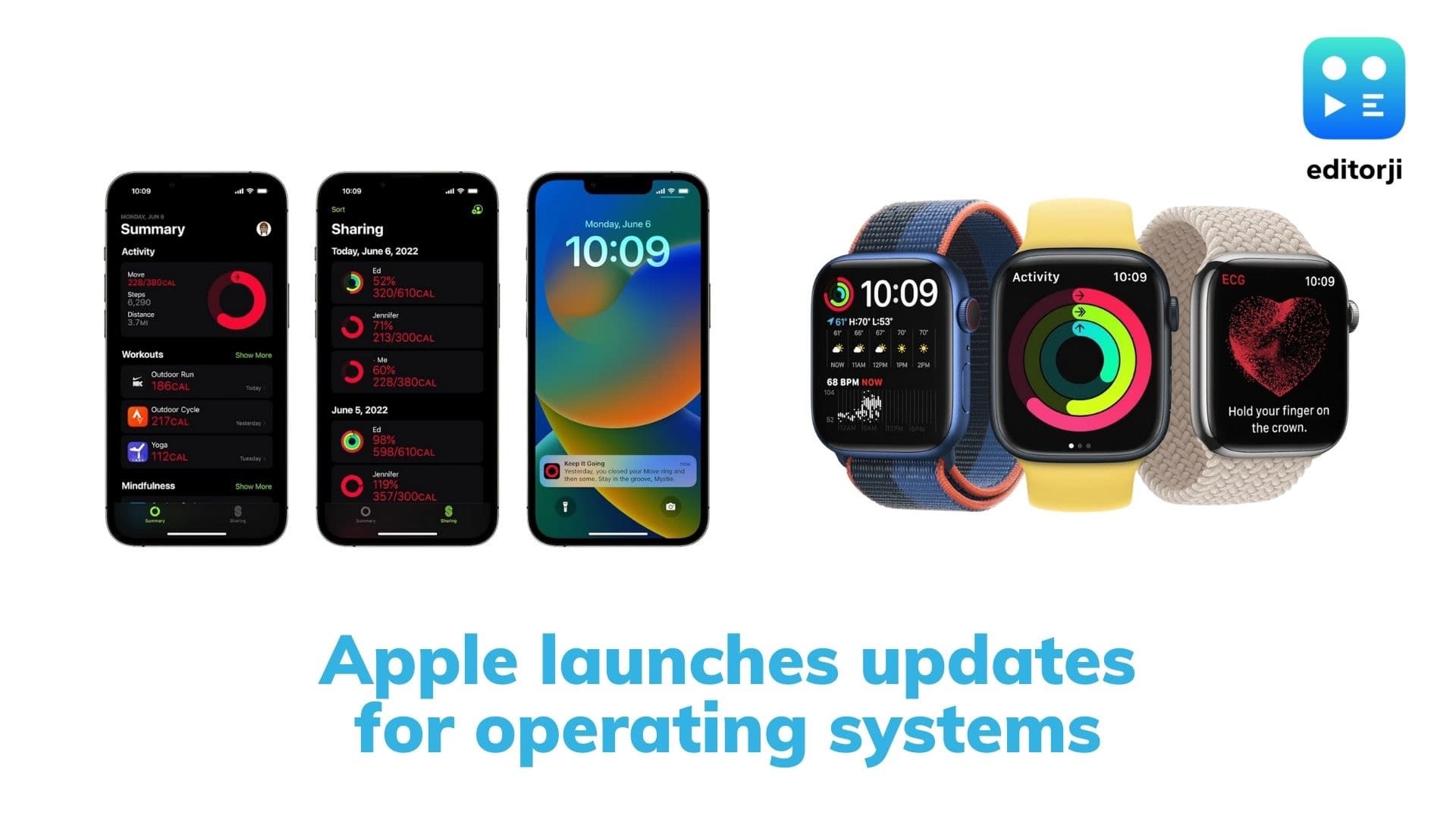
Apple announced a host of new features for its operating systems at WWDC 22, including an overhaul of the lockscreen on the iPhone, and a new focus on multi-tasking for the iPad.

WWDC 22: Apple announces a host of new features for iOS 16, iPadOS 16, and macOS Ventura

Apple announced a host of new features for its operating systems at WWDC 22, including an overhaul of the lockscreen on the iPhone, and a new focus on multi-tasking for the iPad.

iOS 16

Apple announced a host of new features for the upcoming iOS 16, including a comprehensive redesign to the lockscreen. The new iOS lockscreen has lots of scope for very granular customisation, including fonts, colours, and wallpapers, which can be picked using a new wallpaper gallery. iOS 16 also gets lockscreen widgets, which can display information like unread messages and the temperature. iOS 16 users can set different lockscreen setups for different Focus modes as well.

Notifications get a new ‘live activity’ style, and now roll in from the bottom on the lockscreen.

The iMessage app will now allow users to edit messages, and to unsend a message if they so choose. SharePlay is now more deeply integrated with FaceTime.

The dictation feature has also received improvements, and Live Text now works with video, and gets quick actions. The new redesigned Apple Maps is also coming to a lot more countries, although India is not yet on the list.

Family Sharing is getting more granular controls for restricting access to content. The Photos app is getting a new Shared Library to make it easier for users to share content with their friends and families.

The new Safety Check feature makes it easier for people to review and turn off sharing their data and location if needed for their personal safety.

Apple also announced a new open standard for smart home devices called Matter, with HomeKit baked in, with a focus on privacy and data sharing.

CarPlay has received a complete design overhaul, and will now take over all available screens on supported cars, including the driver’s information gauge, and present data in a host of new customisable ways. Cars with support for next-generation CarPlay will ship starting late next year.

The Fitness app will be available to all iPhone users in iOS 16, even those who don’t use an Apple Watch.

iOS 16 is available to developers as a preview starting today, with a public beta following next month, and a full release coming later this year.

Also Watch: OnePlus 10R Review: is it worth the money?

macOS Ventura

Apple announced the next operating system for Macs will be called macOS Ventura. It will debut the new Stage Manager window management system, which will automatically organize open apps on the side of your screen while centering the one the user is working on. Users can also drag icons from the desktop to the sidelined app icons to import them quickly.

macOS Ventura also sees updates to Spotlight, Mail, and Safari.

Apple also announced Metal 3 graphics API, which will “unleash the full potential of Apple Silicon for years to come”.

iPadOS 16

iPadOS 16 sees the long awaited Weather app finally grace the iPad. A new focus on multi-tasking is evident in iPadOS, with the new Stage Manager window management system, introduced in the new macOS Ventura, also coming to iPadOS. Windows can now overlap with one another, and be dragged and dropped into place. Any iPad with an M1 chip can now also connect to an external display of up to 6K resolution, allowing for up to 8 apps to be displayed simultaneously.

Apple has also introduced a new whiteboard app called Freeform, designed to allow colleagues to contribute to a shared canvas. It supports Apple Pencil, and can pull in a variety of filetypes including PDF documents, images, and web links.

The new Display Zoom feature lets you boost the pixel density of M1-equipped iPads.

iPadOS 16 will be available to developers as a preview starting today, with a public beta following next month, and a full release coming later this year.

Also Watch: Asus BR1100C review: the perfect laptop for kids?

watchOS 9

watchOS 9 gets new redesigned watch faces, and a new overhauled Siri experience. Sharing content from watchOS has also been made easier. The new Workout app is getting three new running metrics to better track your workouts.

The smartwatch operating system will now let you switch quickly between cycling, swimming, and running workouts. Users can now use the digital crown to switch between workout views, and create custom workouts.

The watchOS 9 app now supports medication reminders, which will be tied to the Health app and will let users build a ‘medications list’ as well as customized schedules.

ADVERTISEMENT

Up Next

WWDC 22: Apple announces a host of new features for iOS 16, iPadOS 16, and macOS Ventura

WWDC 22: Apple announces a host of new features for iOS 16, iPadOS 16, and macOS Ventura

Samsung CEO Says Next Galaxy Foldables Will Be Thinner, Lighter and Smarter

Samsung CEO Says Next Galaxy Foldables Will Be Thinner, Lighter and Smarter

Dell Launches New Pro Precision AI Workstations In India, Introduces Deskside Agentic AI Platform

Dell Launches New Pro Precision AI Workstations In India, Introduces Deskside Agentic AI Platform

Oppo Enco Air5 Review: Incredible Value at ₹3,099

Oppo Enco Air5 Review: Incredible Value at ₹3,099

Samsung Galaxy A27 5G Goes On Sale In India With Cashback Offers, Zero Down Payment Schemes

Samsung Galaxy A27 5G Goes On Sale In India With Cashback Offers, Zero Down Payment Schemes

Nothing Phone (4b) First Impressions: A Strong Debut For The New 'b' Series 

Nothing Phone (4b) First Impressions: A Strong Debut For The New 'b' Series 

ADVERTISEMENT

editorji-whatsApp

More videos

Samsung Galaxy A27 Review: A Dependable Mid-Ranger With Few Surprises

Samsung Galaxy A27 Review: A Dependable Mid-Ranger With Few Surprises

Alienware 15 Launched In India: AMD Ryzen Power, RTX Graphics & 165Hz Display, Starting From ₹1.15 Lakh

Alienware 15 Launched In India: AMD Ryzen Power, RTX Graphics & 165Hz Display, Starting From ₹1.15 Lakh

Oppo Reno 16 Review: Oppo's Most Complete Reno Yet

Oppo Reno 16 Review: Oppo's Most Complete Reno Yet

Marshall Bromley 450 Launched In India With 360-Degree Sound, 40-Hour Battery & Karaoke Support

Marshall Bromley 450 Launched In India With 360-Degree Sound, 40-Hour Battery & Karaoke Support

DailyObjects Node Review: A Charging Station Worth Showing-Off

DailyObjects Node Review: A Charging Station Worth Showing-Off

OnePlus N6 Review: A Practical Budget Phone That Gets the Basics Right

OnePlus N6 Review: A Practical Budget Phone That Gets the Basics Right

Samsung Galaxy A27 5G First Impressions: Samsung's Mid-Ranger Gets Smarter

Samsung Galaxy A27 5G First Impressions: Samsung's Mid-Ranger Gets Smarter

Samsung Galaxy A27 5G launched with Infinity-O display,  Snapdragon 6 Gen 3 & expanded AI features

Samsung Galaxy A27 5G launched with Infinity-O display, Snapdragon 6 Gen 3 & expanded AI features

OnePlus Nord Buds 4 Review: Affordable Earbuds Done Right  

OnePlus Nord Buds 4 Review: Affordable Earbuds Done Right  

90% Of Indian Employees Dread Meetings As Productivity Suffers, Finds Study

90% Of Indian Employees Dread Meetings As Productivity Suffers, Finds Study

Editorji Technologies Pvt. Ltd. © 2022 All Rights Reserved.