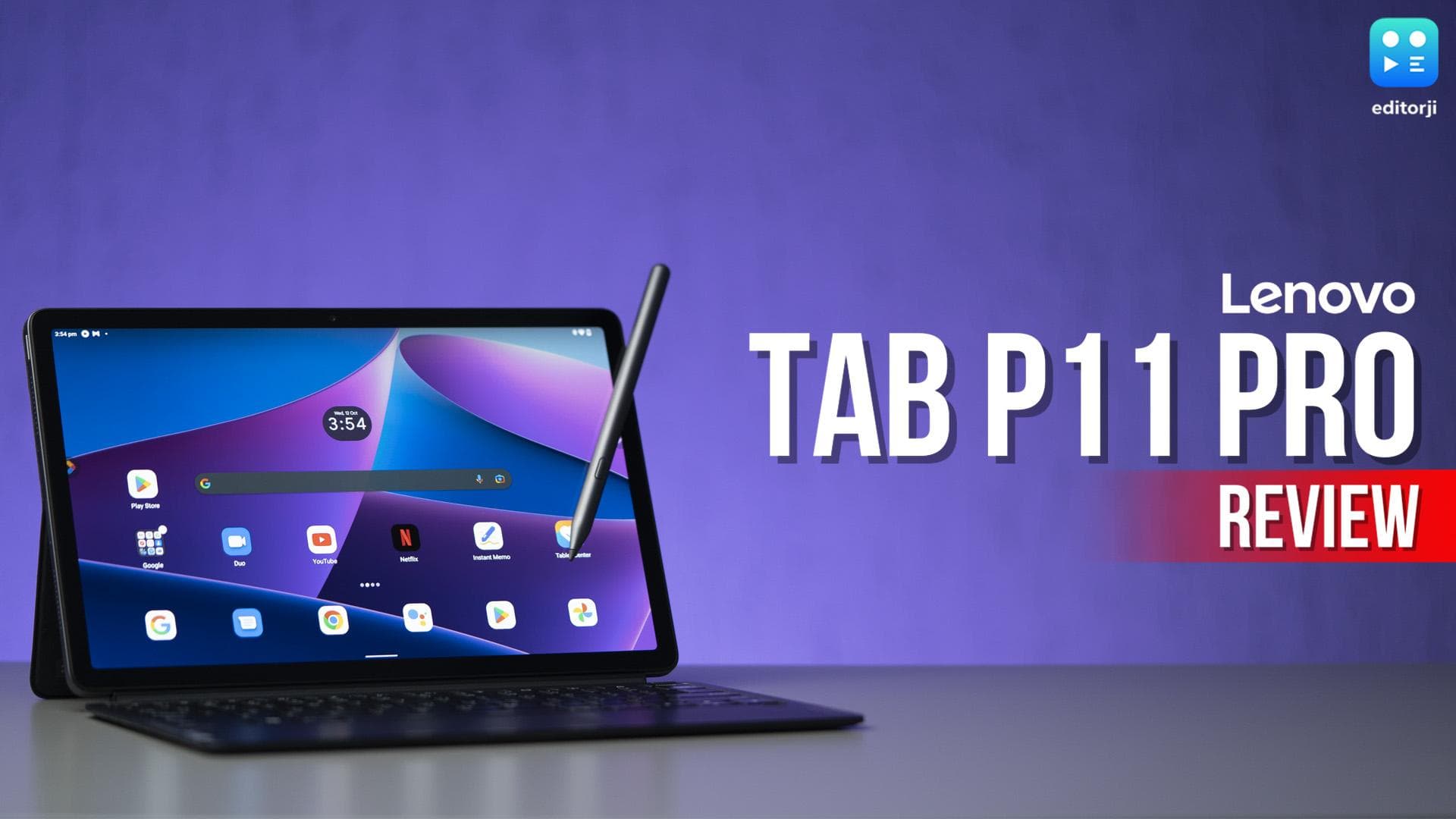
This is the Tab P11 Pro, a new Android tablet from Lenovo that's focused on work, but does very well with play. It comes with an optional keyboard attachment and stylus, which makes this into a productivity powerhouse. It's priced pretty reasonably too, but does it perform well enough to ward off competition from more seasoned players in the tablet market?
Before I answer that question, make sure you hit that like button, and do remember to subscribe to our channel to not miss out on the latest in tech.
Design
The first thing you’ll notice is that this is a pretty thin tablet. At just 6.8mm of thickness, it looks and feels really sleek. Although it does sport an 11.2-inch display, the overall footprint is quite portable, it’s around the size of a hardcover book, and it should fit in most bags very easily. The bezels on said display are not the most slim but they are uniform, and give the tablet quite a polished look.
On the back, the dual-tone grey finish looks extremely professional and classy. On the top, you get the power button and the microSD card slot, while the volume buttons are on the right. On the left you get pogo pin connectors, and on the bottom you’ll find the USB-C port, while both the bottom and top house speaker cutouts.
Utility
So, the optional keyboard cover that you can buy connects to the back cover using a magnetic pogo pin. After which, you can prop up the tablet using the kickstand, and basically use it like a laptop.
The keyboard is really easy to type on, there's adequate spacing between the keys, and the chick-lit design has enough key travel - as much as a MacBook Air. It didn't take me much time to get used to it and get up to my standard typing speed of around 110 WPM - the script for this review was also written on this keyboard. One small nitpick I have is that the delete key is placed right above the backspace key, which can be confusing sometimes if you miss one and hit the other.
Lenovo's 'Productivity Mode', however, leaves something to be desired. When you dock the tab with the keyboard, it automatically turns the productivity mode on, which means you get a desktop-like user interface with a taskbar, active multi-tasking between multiple apps, and the ability to drag apps around like windows. Software compatibility with this mode is still a work in progress - many apps don't support fullscreen in this mode, and I found myself switching back to just regular Android a lot to make things easier.
Also Watch: Sony HT-S400 Soundbar Review: Great bass and great value!
The trackpad is also quite precise, and will feel right at home to people used to Windows or Mac laptops. It doesn't have the biggest surface area, but that comes with the form factor. In regular Android mode, where every app is fullscreen, you do get support for trackpad gestures to switch between apps and all, which does make the interface easy to use. It does need better palm rejection though.
Now we come to the stylus, or the Precision Pen 3, as Lenovo calls it. The stylus is quite comfortable to hold, pretty light, and comes with a soft-touch nib and a programmable button. The writing experience with this is... not very precise. There's a considerable amount of lag when using the pen, which will be very noticeable to artists or even compulsive note-takers who are used to pens with less latency. If you can get over that issue, the stylus is reasonably good to write and draw with, and I used it to make notes just fine. You also get a suite of preloaded apps that use the stylus, like this writing calculator from Microsoft, and a host of stylus-based productivity tools that you can access from this floating bubble.
When you're not using the stylus, it can snap to the back of the tablet using magnets, and there's a slot for it in the back cover too.
One thing I do miss is the lack of any sort of fingerprint unlock here, neither in the display nor on the power button. Your only options for unlocking are just entering a PIN or pattern on the display, or face unlock which works moderately well. It can recognise your face pretty fast sometimes, but it does struggle in some instances.
As far as wireless connectivity goes, you get Wi-Fi 6 and Bluetooth 5.1. There’s no cellular option, which some people will miss, but you can always just hotspot with your phone. The USB-C port has USB 3.2 support for fast data transfer and power delivery 2.0 for charging, and it can also support external displays through DisplayPort 1.4.
Display + Audio
The display is a particular highlight here. This is an 11.2-inch AMOLED display that sports a 2K resolution, which makes this great for both watching content and reading. The 5:3 ratio of the display also means it's very usable both in portrait mode for reading, or in landscape mode for watching widescreen movies, or indeed in laptop mode for typing out a work document. The screen gets reasonably bright for indoor use at 600 nits, but may not be ideal to use in harsh sunlight conditions. It also does have support for HDR10+ and Dolby Vision, which means that you'll get great colours and HDR on supported video content apps, like Netflix.
The speakers are this tablet's biggest strength. This unit has a quad speaker setup, which is provided by JBL, and it shows. They can get really loud while still retaining clarity, have pretty good bass representation, which makes listening to music on this a treat. The presence of Dolby Atmos, which makes the speakers project a pretty wide soundstage, makes this an excellent device for watching movies and TV shows. And, although I know that it's pretty common these days, and Lenovo are hardly the only ones doing it, but it still feels a little weird to not get a headphone jack on a tablet - like, there's enough space here guys, come on.
Also Watch: iQOO Z6 Lite 5G Review: Affordable 5G phone, is it worth it?
Performance
This tablet is powered by the MediaTek Kompanio 1300T chipset, which is similar in performance to the Dimensity 1200 SoC that we've seen in many smartphones over the last year. General performance, for things like social media apps or even working with documents and spreadsheets and stuff, is very snappy. There's also 8GB of LPDDR4x RAM, which is a lot, and makes real multitasking possible. Using the aforementioned productivity mode, it's very possible to keep multiple apps open, and switch between them actively. I had Chrome, a writing app, and Spotify open all at the same time, and switched between them frequently. Overall, the tablet offers a great productivity experience, and you could easily use this as a mobile workstation.
It's also a pretty decent tablet for gaming. While the chipset is not the fastest out there, it's pretty adequate even for most modern demanding games. On Call of Duty Mobile, for example, you can get Max frame rate on the Very High graphics quality setting. Given the form factor, I would recommend pairing a controller with the tablet when possible for serious gaming.
If your use case for this tablet is more of a media centre, then you'll be happy to know that it comes with 256GB of UFS 3.1 storage, which is both fast and very adequate for storing a large amount of movies, books, and music. If you have the world's biggest media library and even that's not enough for you, it also comes with a microSD card slot, which will accept cards up to 1TB. That should be enough for just about anybody.
Cameras
On the Tab P11 Pro, you get an 8MP front camera and a 13MP rear camera. Now cameras aren't really the most important thing on a tablet, you'll be using the rear camera mostly for scanning documents and stuff, but it does capture an acceptable level of quality in images, giving adequate lighting of course.
The front camera, which you're going to use a lot more, is thoughtfully placed in landscape mode, which is ideal for video calls and meetings. As such, quality is acceptable again, and the dual microphone array makes for a good video call experience.
Also Watch: Poco M5 review: Cool design and long battery life
Battery
The Tab P11 Pro comes with an 8,000mAh battery, which is pretty big, and Lenovo promises around 9 hours of web browsing time. In my experience, you can hit that screen time, but only if you're doing something very basic like playing back video or only typing out a document. Any sort of heavy multitasking usage and you're looking more at around 6 hours of screen-on time.
I did experience a bug where Android System would eat up battery all the time, leading to very intense idle battery drain. Hopefully this is the sort of thing that will easily be fixed with an update.
Charging is one area where I would have liked to see Lenovo do better. With the bundled charger, and I guess in 2022 you have to be thankful you at least get a bundled charger, you can charge up the tablet from 0 to 100 in around 2 hours and 15 minutes. This is only if the tablet is left idle, though - if you're using the tablet while charging that time is going to shoot up. With a battery this size, faster charging speeds would have really helped increase the portability and usability factors.
Verdict
The Lenovo Tab P11 Pro is a versatile tablet that is an excellent choice for both work and play. Its keyboard and pen attachments make it a fantastic portable productivity machine, and the excellent display and speakers make for an amazing content watching device too. For a price of Rs. xx for the tablet, and Rs xx with this pen and keyboard bundle, this is a great value for money tablet that does a lot of the things much more expensive tablets do, at a cheaper price.