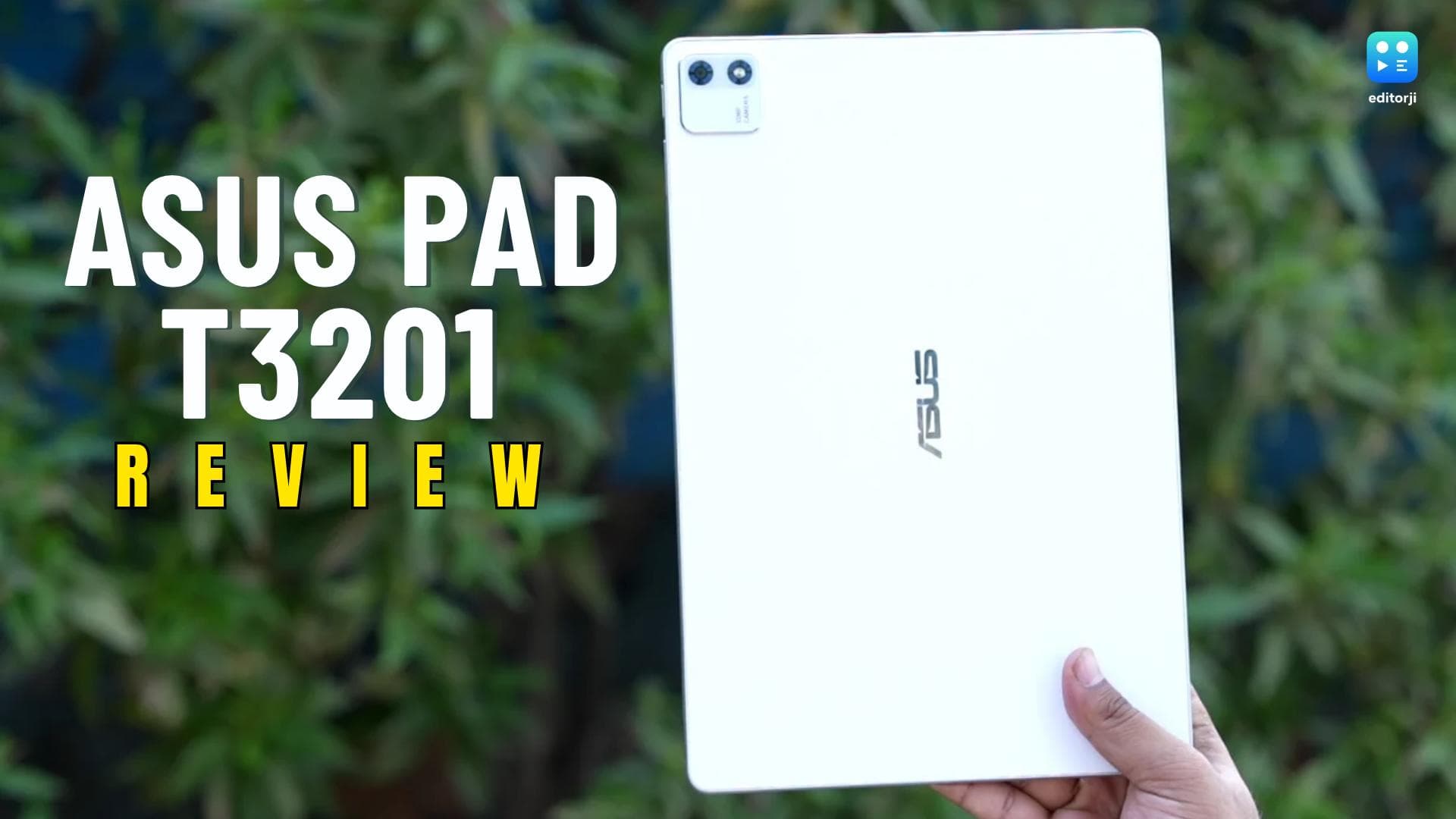
Try shopping around for an Android slate in the ₹45,000 ballpark, and the monotony hits you immediately. It feels like every brand serves the exact same dish: metal casing, unremarkable LCD, and just enough silicon grunt to slide by. Asus wants to disrupt that playbook with the Pad T3201.
The star of the show sits right out front. Packing a 12.2-inch 144Hz 2.8K OLED screen into this price bracket makes you double-check the spec sheet. It originally landed on shelves at ₹43,990 for the 8GB + 128GB version. Right now, though, Asus India’s own web store has slashed that base configuration to ₹35,990, with the 256GB step-up sitting at ₹38,990.
On paper, that panel at that price makes it an effortless recommendation for binge-watchers. Then again, a stellar screen does not automatically guarantee a great device. I spent three full weeks putting the Pad through its paces, jotting notes, streaming video past midnight, and carrying it everywhere to see if the rest of the experience actually keeps pace.
Design and Build Quality
Pulling the Asus Pad out of the box, its in-hand feel immediately stood out. On paper, a 12.2-inch slab measuring 6.5mm in thickness and tipping the scales at 523g might seem hefty, yet the balance across the chassis is executed brilliantly. I routinely spent hours reading long-form articles in bed without dealing with any wrist fatigue or finger cramps.
The tablet comes exclusively in a Pure White finish. While pale gadgets usually attract grime, this one proved surprisingly resilient during my testing. Unlike dark slate slates that turn into greasy fingerprint magnets almost right away, this matte shell stayed remarkably neat. The texture feels soft to the touch, and the frame shows zero creaks or structural flex even when gripped firmly.
A major highlight here is the dedicated microSD slot with support for up to 1TB cards. For anyone carrying heavy offline media files or bulky work documents, expanding capacity without paying for a higher storage trim is a massive practical win.
Around the edges, you will find a snappy USB 3.0 Type-C port that can output video to an external display, though wired audio fans will have to do without a 3.5mm jack. My biggest daily gripe centers on security: Asus omitted a physical fingerprint reader entirely. The front-facing 2D facial recognition handles daylight reasonably well, but as soon as the sun sets, you are left manually punching in your passcode every single time.
Display and Audio Performance
Let’s be honest: the primary reason to pick up this tablet is the display.
Up front sits a 12.2-inch tandem OLED touchscreen with a sharp 2.8K resolution and a fluid 144Hz refresh rate. It adopts a taller 3:2 aspect ratio, hits 100 percent DCI-P3 coverage, and pushes 600 nits in standard use alongside a staggering 2,000 nits peak HDR brightness.
It genuinely ruined other screens in this category for me. After reviewing countless bland LCDs in this segment, streaming movies here was a treat. Watching in dark rooms reveals perfect ink-like blacks, so letterboxing blends seamlessly into the shadows. You get zero backlight bleed around text, and the dynamic range gives visuals serious punch.
There is, however, one weird quirk worth noting. YouTube renders HDR clips with eye-searing brightness, yet Netflix failed to trigger HDR streaming during my time with the unit.
Even capped at standard dynamic range, movies looked far more vibrant than on competing slates. That taller 3:2 canvas also pays dividends for split-screen workflows and browsing web pages. You do get glare on the glossy glass under direct sunlight, but the backlighting has enough brute force to remain legible.
Sound output holds up its end of the bargain. The quad-speaker setup with Dolby Atmos sounds surprisingly full. Rather than the harsh, tinny noise typical of most mobile speakers pushed to high volumes, these deliver legitimate bass presence. Movie trailers retained crisp vocal tracks without drowning out meaty low-end rumbles during action sequences. For casual streaming around the flat, I almost never bothered pairing Bluetooth buds.
Performance and Gaming
Naturally, my biggest question going in was how the MediaTek Dimensity 8300 would fare under pressure. For day-to-day work, it never choked on me. I spent entire afternoons swapping between Slack channels, digging through messy research tabs, taking calls, and typing into Google Docs in split view. Everything ran as expected.
The synthetic runs paint an honest picture. In AnTuTu, the slate put up 1,678,161 points. Over on Geekbench 7, I clocked 1,132 in the single-core test and 4,006 on the multi-core pass. Putting it through the 3DMark Wild Life Extreme stress test yielded a high score of 3,068 with 90.8 per cent stability. Respectable tallies for web browsing and multitasking, but you definitely aren't getting flagship-grade muscle here.
Real gaming told a similar story. An hour-long session of Call of Duty: Mobile stayed consistently smooth, and the broad metal frame kept my hands from sweating. Try importing heavy 4K clips onto a video editing timeline, though, and you will run into stutter right away. Think of it as a dependable everyday machine, not a portable rig meant for competitive play or heavy production.
Software Experience
The software package is easily the weakest link on the Asus Pad. On the bright side, you get clean Android 16 right out of the box without annoying bloatware apps cluttering storage. The built-in Asus GlideX tool is genuinely handy, too. It let me pair the slate wirelessly as an extended laptop display, and dragging reference tabs over to the OLED panel worked like a charm.
Once you move past that, however, the UI feels stripped back. Even on modern Android 16, the iconography and layout look uninspired, almost like something out of an older tablet generation. More frustratingly, Asus skipped an official desktop mode and flexible floating windows. Anyone hoping to treat this 12.2-inch canvas like a mini laptop will find the rigid split-screen setup pretty limiting.
Future longevity is another sore spot. Asus has not spelled out its roadmap for OS version upgrades on this model, which makes holding onto it long term a bit of a gamble.
Battery Life and Charging
Keeping the lights on is a 9,000mAh pack. Lighting up a 12.2-inch 144Hz panel eats power, but the OLED layer does a solid job reining in unnecessary drain.
I put it through my usual daily grind of web reading, social feeds, typing docs, and two hours of video. Off the charger, it consistently gave me between 7.5 and 8.5 hours of screen-on time. That easily covers a full workday without battery anxiety, and it barely lost any charge sitting idle overnight.
Whenever it did tap out, the bundled 45W Type-C charger got it moving fast. Thirty minutes on the wire takes an empty battery to around 50 per cent, and hitting a full 100 per cent takes just about an hour and a half.
Cameras and Accessories
Let’s face it, no one picks up a tablet expecting great photography, and the Asus Pad won’t change your mind. Hardware is minimal here: a single 13MP shooter on the rear alongside a 5MP front lens. During my testing, the back lens handled the usual practical errands, mostly digitizing paper notes, grabbing textbook pages, and filing quick reference shots. The front camera gets the job done for routine Zoom calls, but bright light pouring in from my window blew out my skin tones immediately.
Asus wins points on retail packaging, though. Instead of forcing you to shop for protection right away, a foldable folio case comes straight out of the box. It folds into four useful viewing angles, sparing me from balancing the slab against a coffee cup while catching up on shows or jotting notes.
Touch input supports the Asus Pen 2.0 with 4,096 levels of pressure, but that stylus is sold separately. You won't find a first-party snap-on keyboard either, so anyone looking to type will need to pair a standard Bluetooth board.
Final Verdict: Should You Buy It?
After living with the Asus Pad for a few weeks, the conclusion is straightforward.
If you mainly want something for streaming movies in bed, browsing websites, and watching YouTube, the OLED display alone makes it worth every rupee. The infinite contrast, boisterous quad speakers, and expandable microSD slot make it a dream machine for video lovers. For pure content consumption, no rival LCD in the ₹30,000 to ₹40,000 range holds a candle to it.
Just don’t purchase it hoping to ditch your laptop. The interface feels dated, true floating-window multitasking is missing, you get no first-party keyboard attachment, and future OS support remains an open question.
For sheer entertainment on the go, grab it without thinking twice. But if getting actual work done is the priority, look elsewhere.