Most recommendation apps begin with a question. What do you want to watch? Where do you want to go? What do you want to buy?
Google Dreambeans works differently. It tries to answer before you ask.
I have been using the experimental app ahead of its India rollout, and it feels less like a feed and more like a small, illustrated collection made for your day. It brings together events, books, music, travel ideas, food, films and other things it thinks may interest you. The unusual bit is that it can turn your own photos into artwork too.
In my case, Dreambeans built stories around audio gear, watches, films, books, road trips and live music. It also created illustrated versions of me in settings that felt oddly familiar. It is clearly powered by Google’s data and AI systems, but the experience feels more playful than that sounds.
Google Dreambeans: What it is
Dreambeans is a visual discovery app. Every day, it gives you a set of story cards built around things you may want to explore.
A card could point you towards a book, an event, a restaurant, a local experience or a possible weekend plan. Each comes with an illustration, a short explanation and a relevant action. You can open its Maps listing, look up tickets, save it for later, share it or dig deeper.
It does not feel like an endless stream designed to hold your attention. Instead, it is more like someone has picked a few interesting things for you to consider that day.
Dreambeans can use information from the Google services you choose to link. These include Gmail, Calendar, Photos, Gemini, Search and YouTube. That allows it to work with more context than a service that simply knows the last few things you searched for.
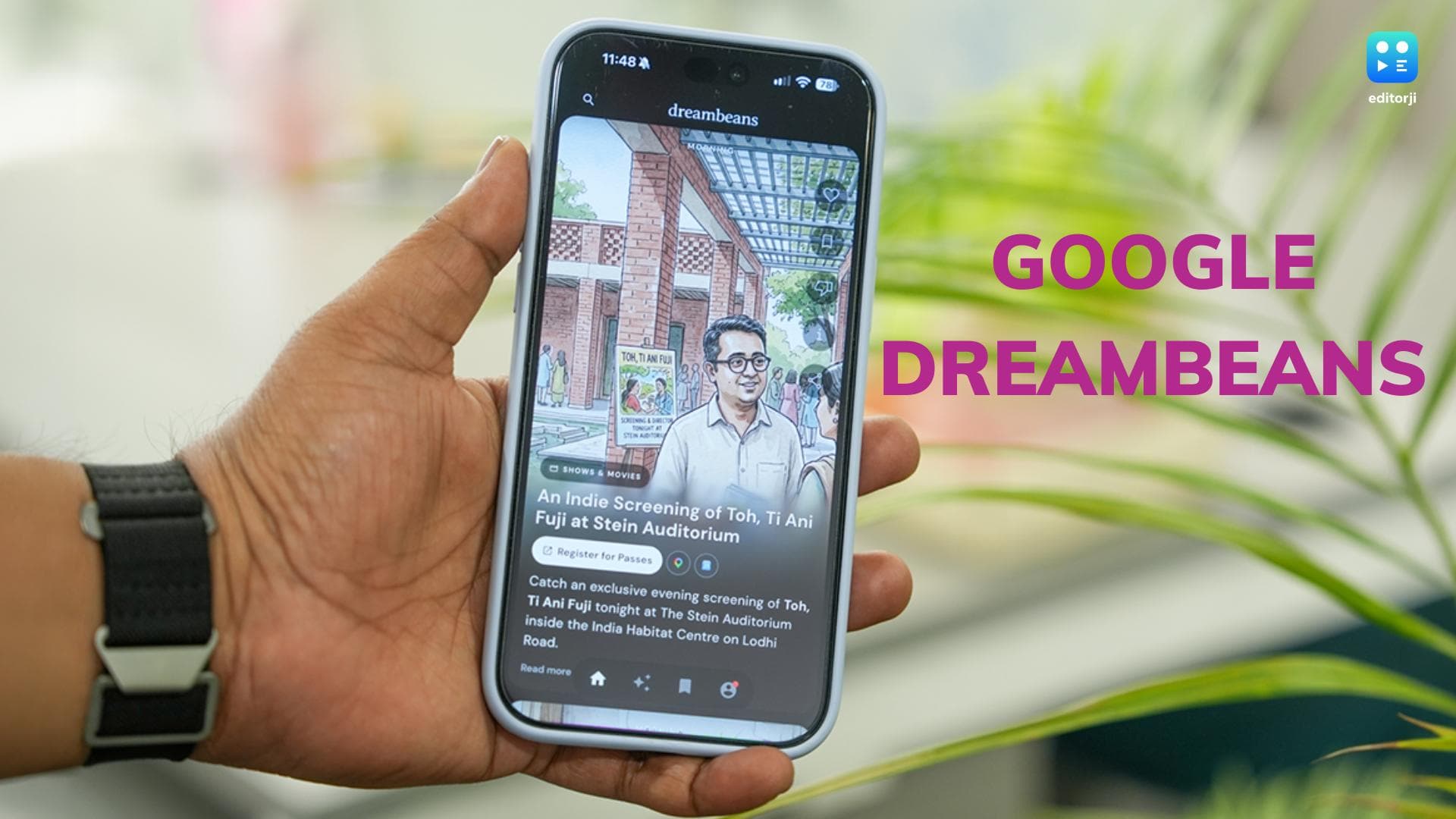
For example, it surfaced a screening of Toh, Ti Ani Fuji at the Stein Auditorium in India Habitat Centre. I also got a card around a set at NODO in Khan Market, and another that suggested booking passes for Adam Port at the NSIC Grounds.
None of these were impossible to find independently. But Dreambeans brought them to me at the right moment, without making the experience feel like a generic listing of things happening in Delhi.
Google Dreambeans: How it worked for me
The most effective cards were the ones that connected a specific interest to something new.
One recommendation led me to Adrian Tchaikovsky’s Service Model. The card showed a robot butler in a warm, slightly surreal reading-room setting. When I checked why Dreambeans had suggested it, the app explained that it had picked up on my interest in speculative fiction, dystopian stories, technology and automation.
That explanation is important. It gives the recommendation some context, and it gives you a way to judge whether the app has understood you correctly. Dreambeans also suggests related questions to ask, other books to explore and possible directions to take the discovery further.
Then came the more personal cards.
Dreambeans used photos from my account to create a watercolour-style version of me on an early-morning drive towards Neemrana. Another card placed me in a mountain escape. Some stories were not just still illustrations either. They appeared as short animated clips.
The app is not trying to recreate an old photo or document an exact memory. It takes cues from your life and turns them into a possible version of what you could do next.
That could be a quiet Kumaon retreat, a stargazing trip to Hanle, a Formula 4 event at the Buddh International Circuit, a walk around Lodhi Art District or a new watchmaking rabbit hole. One card might be aspirational. The next might be useful for a morning Metro commute.
That is where Dreambeans gets interesting. It can surprise you, but the surprises still feel connected to your interests.
Google Dreambeans: The data question
The app needs access to personal context to work this way. Google is fairly clear about that from the outset.
Dreambeans uses information from the services you actively choose to connect. You need to add at least one source before it can begin building a personalised collection. How much of your digital life you share is entirely up to you.
I found the controls easy enough to locate. From the profile section, you can check which Google apps are connected, manage Photos access, control conversation history, change the language, switch daily notifications on or off, and delete Dreambeans data.
You can also tell it when a card is not relevant. That feedback helps shape future suggestions. If you want more books, more events or fewer travel ideas, the app gives you a way to nudge it in that direction.
Connecting Photos gives Dreambeans more scope to make its illustrated stories feel personal. Gmail, Search and Calendar can help it understand the things you may already be planning, considering or curious about.
That makes the privacy decision more nuanced than a simple yes or no. You can use Dreambeans with limited context, or gradually connect more services if you want the experience to feel more tailored.
Google Dreambeans: Availability and languages
Dreambeans is now available in India on Android and iOS.
Google is launching the app in 14 languages: English, Hindi, Bengali, Telugu, Marathi, Tamil, Urdu, Gujarati, Kannada, Malayalam, Odia, Punjabi, Assamese and Nepali.
That broad language support is especially relevant here. Dreambeans is built around everyday discovery, whether that is something to watch, somewhere to go, an event to attend or a conversation to start. It needs to feel local, not like another AI product designed only for English-speaking users.
Dreambeans is still an experiment, and it will need to prove that its suggestions remain useful over time. But even at this early stage, I like the idea behind it. It turns discovery into something more visual, more personal and, occasionally, a little more magical than another list of links.