Highlights

  • Enhanced widget library interface
  • New photos widget
  • Upgraded screenshot editor and menu

Latest news
Realme 16T 5G Review: Battery anxiety officially cancelled 

Realme 16T 5G Review: Battery anxiety officially cancelled 

Anand Rathi Picks MARKOLINES as its Stock Pick of the month for target of Rs 188

Anand Rathi Picks MARKOLINES as its Stock Pick of the month for target of Rs 188

US bond market volatility marks first stress test for new Fed Chair Kevin Warsh: Jefferies

US bond market volatility marks first stress test for new Fed Chair Kevin Warsh: Jefferies

BingX Unveils "Infinite Vision" on 8th Anniversary, Accelerating Multi-Asset Expansion

BingX Unveils "Infinite Vision" on 8th Anniversary, Accelerating Multi-Asset Expansion

Best Haier ACs to Upgrade Home Cooling in India in 2026

Best Haier ACs to Upgrade Home Cooling in India in 2026

Minister Piyush Goyal highlights high-level meetings undertaken to deepen trade and investment with various countries

Minister Piyush Goyal highlights high-level meetings undertaken to deepen trade and investment with various countries

Samsung Electronics' tentative wage deal draws backlash over chip-heavy bonus plan

Samsung Electronics' tentative wage deal draws backlash over chip-heavy bonus plan

"Hate Michael Jackson for dying": Ram Gopal Varma gets emotional after watching biopic

"Hate Michael Jackson for dying": Ram Gopal Varma gets emotional after watching biopic

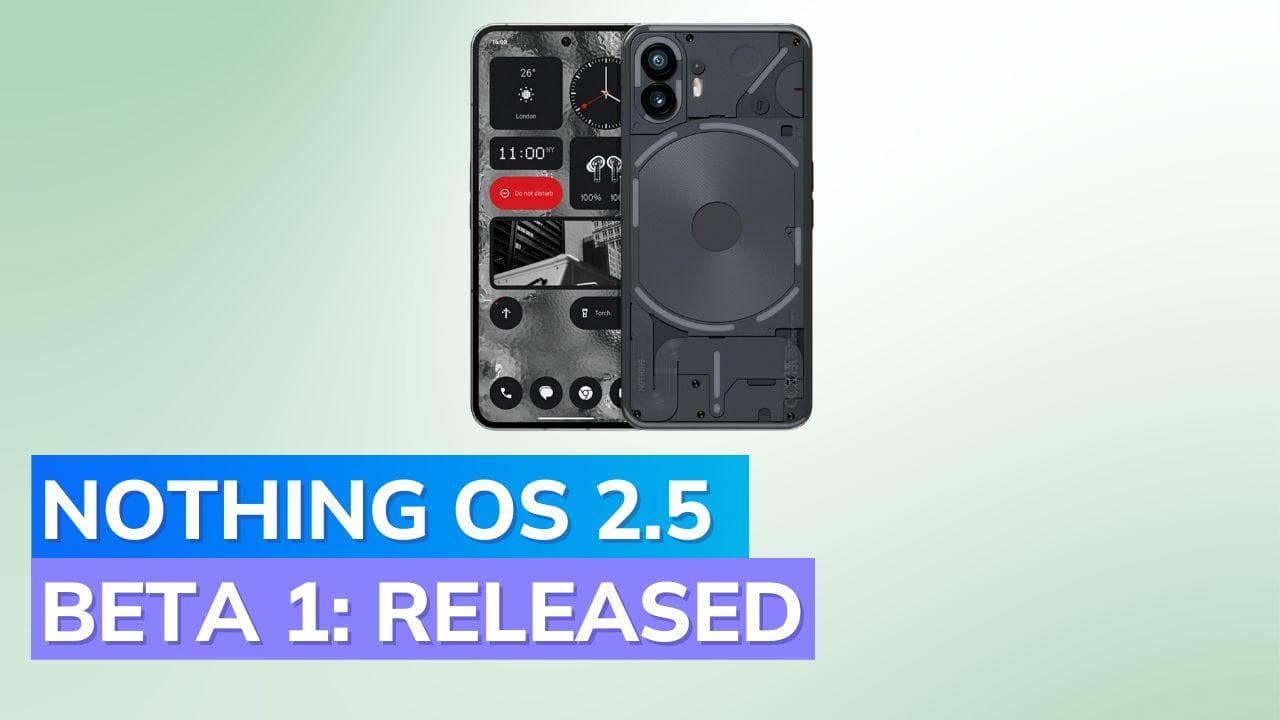
Nothing OS 2.5 Open Beta 1 with Android 14 features released for Nothing Phone 2: What's New?

  • Enhanced widgets for Nothing OS 2.5.
  • New photos widget; updated screenshot tools.
  • Android 14: Monochrome theme & improved settings.
Nothing OS 2.5 Open Beta 1 with Android 14 features released for Nothing Phone 2: What's New?

Nothing, the prominent technology brand from London, has recently rolled out the Nothing OS 2.5 Open Beta 1 for Nothing Phone 2. This update is notably significant, marking a major leap since the debut of OS 2.0 in July.

The Nothing OS 2.5 new features aim to redefine the smartphone experience, making it both efficient and tailored to the user.

Highlights of Nothing OS 2.5 Improvements

1. The widget library interface has been enhanced, ensuring Nothing widgets stand out more prominently.

2. A new photos widget is now available, allowing users to display their top photos on both the Home Screen and Lock Screen.

3. The screenshot editor and menu have been upgraded, offering advanced editing tools and swift deletions.

4. The back gesture's design has been refined to better reflect Nothing's signature style.

5. Users can now opt to hide app icons on the Home Screen and app drawer. A rightward swipe in the app drawer reveals these concealed icons.

6. Capturing screenshots has been made more intuitive with a three-finger swipe.

7. The double-press power button feature can now be customized, providing quick access to a user-selected function.

8. A unified Home Screen and Lock Screen customization page offers a comprehensive view of customization options.

9. The newly introduced glass filter adds a unique touch to favorite wallpapers.

10. For those who appreciate minimalism, new solid color wallpapers have been added to enhance the Home Screen's aesthetics.

Android 14 Features on Nothing Phone

1. A monochrome color theme has been incorporated into the basic color options.

2. An improved back gesture enhances interactions with apps.

3. The Quick Settings layout has been revamped, now featuring Nothing earbuds icons.

4. The Lock Screen now boasts additional shortcut options, including do not disturb, mute, QR code scanner, and video camera functionalities.

5. Users can set ringtone and notification sound volumes separately, thanks to an updated volume control interface.

6. Regional settings have been added, allowing customization of unit and number preferences.

How to Download Nothing OS 2.5 Beta

It's crucial to understand that the Nothing OS 2.5 Open Beta 1 is still in its testing phase, implying potential software instabilities.

For those already in the Beta program, the Nothing Phone 2 software update can be accessed via Settings > System. If you're keen on joining the Beta program, the guide suggests visiting nothing.community.

Wrap Up

With the exclusive Android 14 preview on the Nothing Phone 2 Beta release, users can look forward to a range of innovative features and enhancements.

In the near future, more information will be shared about the exclusive Android 14 preview and its comprehensive rollout to Phone (1) and Nothing Phone 2 devices.

Also watch: Google makes Passkeys the default sign-in method for personal accounts

ADVERTISEMENT

Up Next

Nothing OS 2.5 Open Beta 1 with Android 14 features released for Nothing Phone 2: What's New?

Nothing OS 2.5 Open Beta 1 with Android 14 features released for Nothing Phone 2: What's New?

Oppo Find X9s Review: The Android All-Rounder That Actually Delivers, Big Time!

Oppo Find X9s Review: The Android All-Rounder That Actually Delivers, Big Time!

Kenstar Tallde 105 BLDC Cooler Review: The Appliance That Made Delhi Summer Slightly Less Hostile

Kenstar Tallde 105 BLDC Cooler Review: The Appliance That Made Delhi Summer Slightly Less Hostile

Vivo X300 Ultra Review: This Flagship Is Basically a Mirrorless Camera

Vivo X300 Ultra Review: This Flagship Is Basically a Mirrorless Camera

OnePlus Nord CE6 Lite Review: The Smartest Budget Buy of 2026? 

OnePlus Nord CE6 Lite Review: The Smartest Budget Buy of 2026? 

Nord CE6 Review: Big Batteries, Smarter AI, and Better Display

Nord CE6 Review: Big Batteries, Smarter AI, and Better Display

ADVERTISEMENT

editorji-whatsApp

More videos

Vivo X300 FE Review: Flagship Performance in a Pocket-Friendly Body

Vivo X300 FE Review: Flagship Performance in a Pocket-Friendly Body

Haier 1.7 Ton 5 Star Gold Decco Desert Rose Air Conditioner Review: When Cooling Gets a Brain

Haier 1.7 Ton 5 Star Gold Decco Desert Rose Air Conditioner Review: When Cooling Gets a Brain

OnePlus Pad 4 Review: This Might Be the Android Tablet to Beat

OnePlus Pad 4 Review: This Might Be the Android Tablet to Beat

Samsung Galaxy Book6 Pro Review: This Might Be Samsung’s Most Complete Laptop Yet

Samsung Galaxy Book6 Pro Review: This Might Be Samsung’s Most Complete Laptop Yet

Xiaomi TV S Mini LED 65-inch Review: Price, Specs, Features & Performance  

Xiaomi TV S Mini LED 65-inch Review: Price, Specs, Features & Performance  

Under Armour Velociti Distance Review: Built for the Long Run

Under Armour Velociti Distance Review: Built for the Long Run

Vivo T5 Pro Review: This Phone Refuses to Die

Vivo T5 Pro Review: This Phone Refuses to Die

OnePlus Nord 6 Review: The new endurance king that almost has it all

OnePlus Nord 6 Review: The new endurance king that almost has it all

HyperX Pulsefire Saga Review: The mouse that lets you be the designer

HyperX Pulsefire Saga Review: The mouse that lets you be the designer

Samsung Galaxy A57 & A37 Review: Safe Upgrades or Missed Opportunity?

Samsung Galaxy A57 & A37 Review: Safe Upgrades or Missed Opportunity?

Editorji Technologies Pvt. Ltd. © 2022 All Rights Reserved.