Highlights

  • Google unveils earthquake alert system for Android in India.
  • Alerts available in multiple Indian languages.
  • "Be Aware" and "Take Action" - two distinct alert types.
  • System employs smartphone sensors for tremor detection.

Latest news

Future Netwings Solution Enhances Service Delivery with the Business Continuity Policy

Future Netwings Solution Enhances Service Delivery with the Business Continuity Policy

India-UK trade deal likely by May 1; Europe deal expected by year-end

India-UK trade deal likely by May 1; Europe deal expected by year-end

VerSe Innovation Appoints Prasanna Prasad as Chief Product and Technology Officer to Accelerate AI-Led Product and Platform Innovation

VerSe Innovation Appoints Prasanna Prasad as Chief Product and Technology Officer to Accelerate AI-Led Product and Platform Innovation

Changing Aspirations of Premium Homebuyers in NCR

Changing Aspirations of Premium Homebuyers in NCR

Airfloa Rail Technology's FY26 Business Update and Strategic Direction

Airfloa Rail Technology's FY26 Business Update and Strategic Direction

Sanjay Khanna Appointed as Chairman & Managing Director of BPCL

Sanjay Khanna Appointed as Chairman & Managing Director of BPCL

Galgotias University Placement Report: 4700+ Offers Across Top Recruiters in 2026

Galgotias University Placement Report: 4700+ Offers Across Top Recruiters in 2026

"Be the same loving brother you are to me...": Sanjay Dutt pens heartfelt birthday note for Anant Ambani

"Be the same loving brother you are to me...": Sanjay Dutt pens heartfelt birthday note for Anant Ambani

Google launches earthquake alert system for Android in India

Google has launched an earthquake alert system for Android devices in India, using phone sensors for detection. The alerts come in two types and are available in various Indian languages. Google also offers AI-powered flood alerts across the country.

Google launches earthquake alert system for Android in India

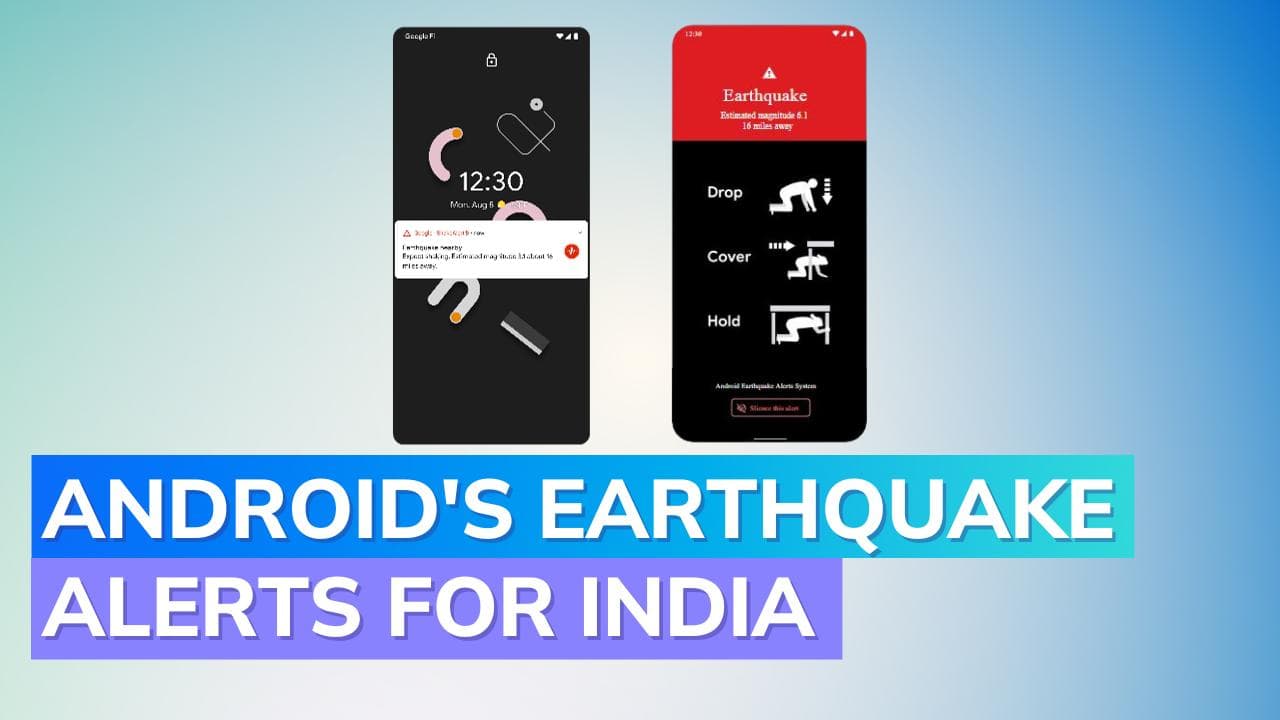
Google Android Earthquake Alert: In a significant move, Google has unveiled its earthquake alert system for Android devices tailored for the Indian demographic. The innovative system taps into the smartphone's inherent sensors, transforming them into makeshift seismometers capable of detecting ground tremors.

Harnessing Smartphone Capabilities for Earthquake Detection

The Google earthquake alert system for Android utilizes accelerometers found in phones to recognize seismic movements. Collaborating closely with India's National Disaster Management Authority (NDMA) and the National Seismology Center (NSC), Google has ensured that these alerts cater to areas expected to face the earthquake's impact.

Additionally, to cater to the diverse linguistic landscape of India, Google earthquake alerts are available in multiple Indian languages that Android supports.

Understanding Google's Dual Alert System

Google disseminates two distinct alert types to its users: "Be Aware" and "Take Action". The "Be Aware" notifications are designated for those who undergo MMI 3 & 4 tremors during a seismic activity of magnitude 4.5 or higher. These alerts, when displayed, respect the phone's "Do Not Disturb" or silent configurations, ensuring no audible disturbance.

Conversely, for tremors rated at MMI 5+ during an earthquake scaling 4.5 or above, Google forwards alerts that override the phone's earthquake alert system settings.

This ensures that even if the phone is on "Do Not Disturb", it will emit a loud alarm. Alongside the warning, Google provides invaluable guidance on immediate steps, like seeking shelter beneath sturdy furniture, to safeguard oneself.

Google Earthquake Alert's Underlying Technology and Efficiency

One might wonder, how does Google's earthquake alert system function? The method involves numerous Android phones concurrently recording seismic activity within a given region. Google earthquake alerts AI processes this consolidated data, enabling the system to transmit warnings often moments before the tremors are felt.

How to Enable Google Earthquake Alerts on Your Android Phone in India

For those eager to harness this feature, ensuring their phone runs on Android 5 or a subsequent version is crucial. Additionally, maintaining an active Wi-Fi or cellular data connection is mandatory. To activate the Google earthquake alert settings, one can navigate to Settings > Safety & Emergency > Earthquake Alerts. A secondary pathway to enable these alerts is through Settings > Location > Advanced > Earthquake alerts.

Broader Safety Initiatives by Google in India

Beyond earthquakes, Google has been proactive in offering technologically advanced safety solutions for Indians. The tech giant has been disseminating AI-driven flood alerts throughout India.

This initiative took root in 2018, starting as a pilot in Patna, Bihar's capital. Recognizing its success and the broader Google earthquake alert system India benefits, the company scaled up the flood alerts to encompass the entirety of India by 2020.

Wrap Up

Google's commitment to leveraging technology for safety, as evidenced by its earthquake and flood alert systems, promises a safer and more informed future for users across India.

Also Watch: WhatsApp to stop working on these devices: Check full details and list

ADVERTISEMENT

Up Next

Google launches earthquake alert system for Android in India

Google launches earthquake alert system for Android in India

OnePlus Nord 6 Review: The new endurance king that almost has it all

OnePlus Nord 6 Review: The new endurance king that almost has it all

HyperX Pulsefire Saga Review: The mouse that lets you be the designer

HyperX Pulsefire Saga Review: The mouse that lets you be the designer

Samsung Galaxy A57 & A37 Review: Safe Upgrades or Missed Opportunity?

Samsung Galaxy A57 & A37 Review: Safe Upgrades or Missed Opportunity?

Samsung Galaxy Buds4 Pro Review: Flagship Sound Meets Elite ANC

Samsung Galaxy Buds4 Pro Review: Flagship Sound Meets Elite ANC

Realme 16 5G Review: Endurance Meets Everyday Use

Realme 16 5G Review: Endurance Meets Everyday Use

ADVERTISEMENT

editorji-whatsApp

More videos

Vivo V70 FE Review: Style Meets Serious Battery Power

Vivo V70 FE Review: Style Meets Serious Battery Power

OnePlus Nord 6 First Look: Specifications, Features, and What to Expect

OnePlus Nord 6 First Look: Specifications, Features, and What to Expect

Samsung Galaxy S26 & S26+ Review: Exynos is Back, And It Means Business

Samsung Galaxy S26 & S26+ Review: Exynos is Back, And It Means Business

OnePlus Nord Buds 4 Pro Review: Better in All the Right Ways? feat. Nord Buds 3 Pro

OnePlus Nord Buds 4 Pro Review: Better in All the Right Ways? feat. Nord Buds 3 Pro

Poco X8 Pro Max Review: Big Battery, Bigger Ambitions

Poco X8 Pro Max Review: Big Battery, Bigger Ambitions

iQOO Z11x 5G Review: The best budget phone under 20K?

iQOO Z11x 5G Review: The best budget phone under 20K?

Nothing Phone (4a) Pro Review: This One Finally Feels Complete

Nothing Phone (4a) Pro Review: This One Finally Feels Complete

Samsung Galaxy S26 Ultra Review: Pros, Cons & Real-World Test

Samsung Galaxy S26 Ultra Review: Pros, Cons & Real-World Test

Xiaomi 17 Review: Is This the Best Compact Flagship of 2026?

Xiaomi 17 Review: Is This the Best Compact Flagship of 2026?

Xiaomi Pad 8 Review: The Smart Value King Returns

Xiaomi Pad 8 Review: The Smart Value King Returns

Editorji Technologies Pvt. Ltd. © 2022 All Rights Reserved.