Highlights

  • Android 12L targeted at foldables and tablets
  • New taskbar for easier multi-tasking
  • Notifications and quick settings now in split view

Latest news
iQOO Buds Review: Monster Battery and Serious Gaming Chops for under ₹2,000 

iQOO Buds Review: Monster Battery and Serious Gaming Chops for under ₹2,000 

Repo rate today at 5.25%: how long an RBI decision takes to reach your home loan interest rate

Repo rate today at 5.25%: how long an RBI decision takes to reach your home loan interest rate

CMF Buds Neo Review: 35dB ANC, 52-Hour Battery and Incredible Value

CMF Buds Neo Review: 35dB ANC, 52-Hour Battery and Incredible Value

iQOO Z11 Review: A Balanced Mid-Range Powerhouse

iQOO Z11 Review: A Balanced Mid-Range Powerhouse

Samsung Galaxy Watch 9 Review: Familiar, Faster And Better Where It Matters

Samsung Galaxy Watch 9 Review: Familiar, Faster And Better Where It Matters

Samsung Galaxy Watch Ultra2 Review: A Smarter, Tougher and Longer-Lasting Ultra

Samsung Galaxy Watch Ultra2 Review: A Smarter, Tougher and Longer-Lasting Ultra

Gabit Smart Ring Review: A Better Way To Track Your Health? 

Gabit Smart Ring Review: A Better Way To Track Your Health? 

Xiaomi Power Bank 5i 20000 67W Review: A Powerful Travel Companion

Xiaomi Power Bank 5i 20000 67W Review: A Powerful Travel Companion

Google announces Android 12L with features for tablets and foldables

Google has announced Android 12L, a new update for Android 12 with features targeted at devices with large screens, like tablets and foldables.

Google announces Android 12L with features for tablets and foldables

Google has announced Android 12L, a new update for Android 12 with features targeted at devices with large screens, like tablets and foldables.

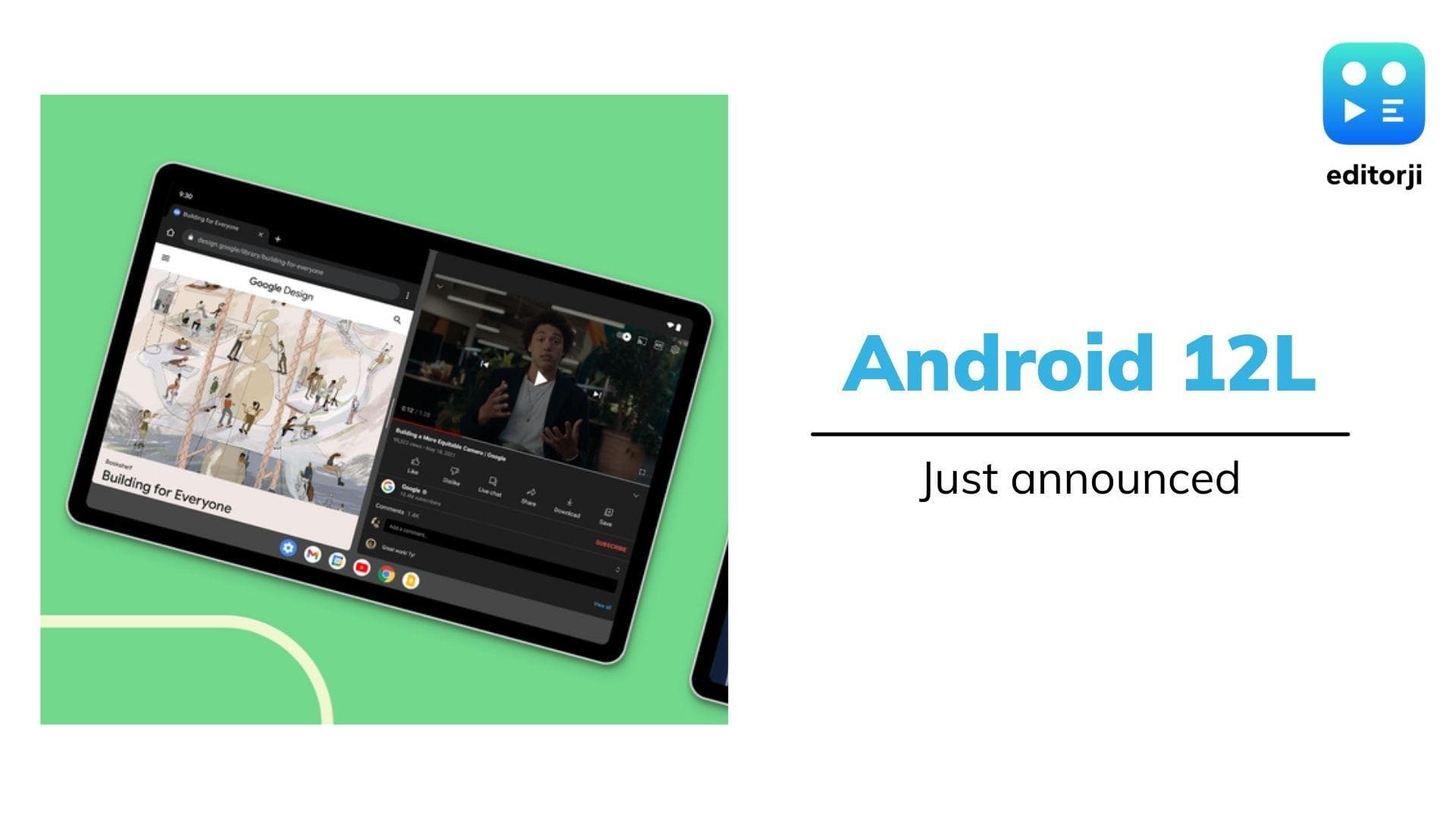
The Android 12L update brings a change to the notification drawer in landscape orientation, with quick settings on the left and notifications on the right. Google says that with this change, users will have more space to view and swipe away notifications.

Google has also introduced a new two-column layout in the settings app. This has already been introduced by many tablet and foldable manufacturers, but is now finally baked into stock Android.

Also Watch: Samsung Galaxy S22 & Galaxy S22+ Unboxing: what's in the box?

Android 12L features

The biggest change in Android 12L is the introduction of a new taskbar, which will always sit at the bottom of the display. This is meant to help with multi-tasking, allowing users to launch and switch between apps easily. Users can also drag-and-drop any app from the taskbar to enable split screen mode.

Android 12L will come to foldables and tablets later this year, with devices from Samsung, Lenovo, and Microsoft already confirmed to get the update. Google also says they will continue to build more updates and functionalities for larger screen devices in Android 13 and beyond.

Frequently Asked Questions

Android 12L is a new update for Android 12 with features specifically targeted at devices with large screens, such as tablets and foldables.

ADVERTISEMENT

Up Next

Google announces Android 12L with features for tablets and foldables

Google announces Android 12L with features for tablets and foldables

iQOO Buds Review: Monster Battery and Serious Gaming Chops for under ₹2,000 

iQOO Buds Review: Monster Battery and Serious Gaming Chops for under ₹2,000 

CMF Buds Neo Review: 35dB ANC, 52-Hour Battery and Incredible Value

CMF Buds Neo Review: 35dB ANC, 52-Hour Battery and Incredible Value

iQOO Z11 Review: A Balanced Mid-Range Powerhouse

iQOO Z11 Review: A Balanced Mid-Range Powerhouse

Samsung Galaxy Watch 9 Review: Familiar, Faster And Better Where It Matters

Samsung Galaxy Watch 9 Review: Familiar, Faster And Better Where It Matters

Samsung Galaxy Watch Ultra2 Review: A Smarter, Tougher and Longer-Lasting Ultra

Samsung Galaxy Watch Ultra2 Review: A Smarter, Tougher and Longer-Lasting Ultra

ADVERTISEMENT

editorji-whatsApp

More videos

Gabit Smart Ring Review: A Better Way To Track Your Health? 

Gabit Smart Ring Review: A Better Way To Track Your Health? 

Xiaomi Power Bank 5i 20000 67W Review: A Powerful Travel Companion

Xiaomi Power Bank 5i 20000 67W Review: A Powerful Travel Companion

Redmi Note 17 Review: Still Worth the Note Name?

Redmi Note 17 Review: Still Worth the Note Name?

 iQOO Z11 Shows What Useful Smartphone AI Should Look Like

iQOO Z11 Shows What Useful Smartphone AI Should Look Like

Google Launches Pixel 11 Series, Showcases Next-Gen Silicon and Deeper AI Integration

Google Launches Pixel 11 Series, Showcases Next-Gen Silicon and Deeper AI Integration

Marshall Bromley 450 Review: Powerful 360° Sound Meets Iconic Design

Marshall Bromley 450 Review: Powerful 360° Sound Meets Iconic Design

Vivo S2 Review: Massive Battery, Premium Design, Minimal Compromises

Vivo S2 Review: Massive Battery, Premium Design, Minimal Compromises

Samsung Galaxy Z Fold 8 Review: The Foldable That Finally Delivers on the Phone-Tablet Dream

Samsung Galaxy Z Fold 8 Review: The Foldable That Finally Delivers on the Phone-Tablet Dream

Urban Company Launches Native M3 & M3 Pro Water Purifiers: Premium Design Meets 3-Year Zero Maintenance

Urban Company Launches Native M3 & M3 Pro Water Purifiers: Premium Design Meets 3-Year Zero Maintenance

Logitech Launches MK250 Bluetooth Combo and K250 Keyboard in India

Logitech Launches MK250 Bluetooth Combo and K250 Keyboard in India

Editorji Technologies Pvt. Ltd. © 2022 All Rights Reserved.