Highlights

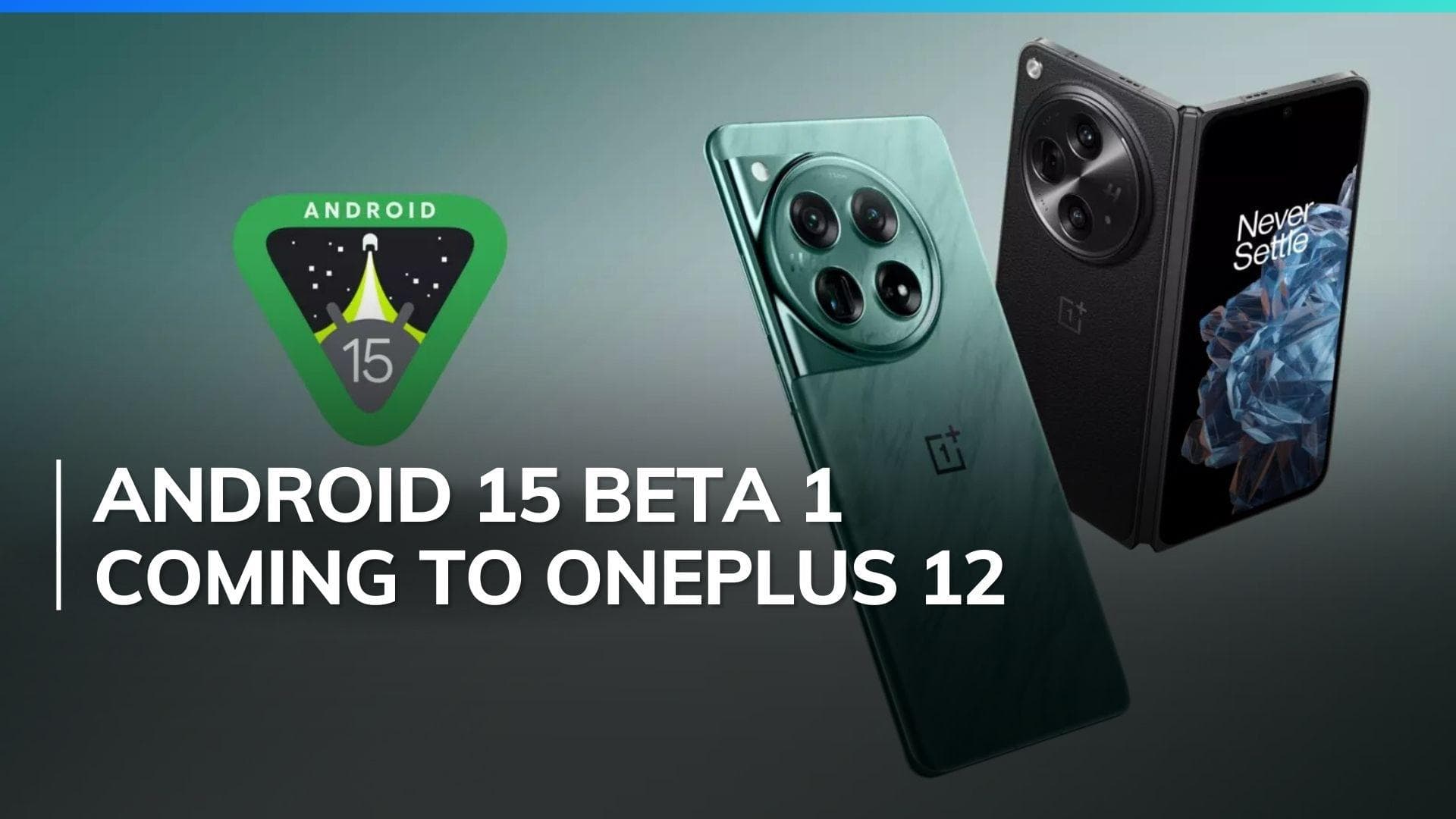
  • OnePlus 12, OnePlus Open announced as the first devices to receive the Android 15 Beta 1 update
  • Starting May 16, the update is available for developers and early adopters
  • Update enhances the camera and media experience

Latest news

GIPMC Strengthens Certification Credibility Through Industry-Aligned Learning Frameworks

GIPMC Strengthens Certification Credibility Through Industry-Aligned Learning Frameworks

Sahara Star: Mumbai's Most Iconic Address for MICE and Wedding Celebrations

Sahara Star: Mumbai's Most Iconic Address for MICE and Wedding Celebrations

Paytm Foundation launches second 'Wisdom on Wheels' mobile learning bus to expand digital and computer education across Odisha

Paytm Foundation launches second 'Wisdom on Wheels' mobile learning bus to expand digital and computer education across Odisha

Mount Litera Zee School, Kalaburagi Achieves 100 Percent Result in First CBSE Class X Batch

Mount Litera Zee School, Kalaburagi Achieves 100 Percent Result in First CBSE Class X Batch

Vedanta's claim of being highest bidder 'false narrative', RP tells NCLAT in Jaypee Associates insolvency case

Vedanta's claim of being highest bidder 'false narrative', RP tells NCLAT in Jaypee Associates insolvency case

"Finest actor of our generation": Namit Malhotra lauds Ranbir Kapoor's performance in 'Ramayana'

"Finest actor of our generation": Namit Malhotra lauds Ranbir Kapoor's performance in 'Ramayana'

Priyadarshani Group of Schools announce 100% success in class 10th CBSE board results across its Pune campuses

Priyadarshani Group of Schools announce 100% success in class 10th CBSE board results across its Pune campuses

Intertek Strengthens Solar Assurance Leadership with Purchase of Mitsui Chemicals Solar Laboratory Assets in India

Intertek Strengthens Solar Assurance Leadership with Purchase of Mitsui Chemicals Solar Laboratory Assets in India

OnePlus 12 and OnePlus Open first to receive Android 15 Beta 1 Update: New features, known issues & more

As we gear up for the launch of Android 15, OnePlus has announced that the OnePlus 12 and OnePlus Open will be the first devices to receive the Beta 1 update. It is now available for developers and early adopters. 

OnePlus 12 and OnePlus Open first to receive Android 15 Beta 1 Update: New features, known issues & more

OnePlus has announced that its flagship smartphones, the OnePlus 12 and OnePlus Open, will be among the first devices to receive the Android 15 Beta 1 update. Starting May 16, developers and early adopters can try out the new features and APIs on these devices through the developer version of OxygenOS, built around Android 15 Beta 1.

Android 15 Beta 1 coming to OnePlus 12 and OnePlus Open: Announcement

In announcing the Android 15 Beta 1 update, OnePlus highlighted its long-standing collaboration with Google. "OnePlus and Google have been in a close partnership for a considerable time, persistently working together to offer the best feasible user experience through our OxygenOS, based on successive versions of Google's Android operating systems," stated Kinder Liu, President and COO of OnePlus.

Liu expressed confidence that Android 15 would fully realize the potential of the OnePlus 12 and OnePlus Open, benefiting both developers and users. "With the advent of Android 15, we are confident that the full potential of our superior devices will be wholly realized," Liu said.

Android 15 Beta 1 Features

Android 15 prioritizes enhancing the camera and media experience, improving connectivity, and delivering new APIs for developers to create better applications. The operating system offers features like Low Light Boost and new extensions such as In-app camera controls, providing users with the tools and hardware to bring their visions to life. The platform also grants applications access to the latest advancements in communication, resulting in smoother NFC experiences and other improvements.

Fixes and Known Issues Revealed

With the release of Android 15 Beta 1, OnePlus has also provided a list of known issues for both devices.

For the OnePlus 12, users might experience problems with Bluetooth compatibility and occasional Wi-Fi connection issues with printers. The Smart Lock function is currently unusable, and some camera features may display incorrectly. Additionally, the Multi-Screen Connect function might not work properly when connecting to a PC or PAD, and some third-party applications could crash.

There are also specific stability issues, and the personal hotspot may fail after modifying security settings. The Auto Pixelate function may not work during screenshot previews, and the ProXDR button might not appear in photos.

For the OnePlus Open, users may encounter similar Bluetooth compatibility issues and abnormal camera function displays in certain scenes. The Multi-Screen Connect function might also be unstable with PC or PAD connections, and there could be crashes with some third-party applications.

The split-screen function might not work correctly, and the smart select and cutout function in Photos may fail when long-pressing a picture. Additionally, creating a System Cloner might result in crashes when entering the main system password, and the quick switch size in the drop-down status bar may become abnormal after changing the screen resolution.

Android 15 Beta 1 OnePlus Devices and Availability

The Android 15 Beta 1 update will be available for the OnePlus 12 and OnePlus Open. These devices aim to deliver flagship-level performance with Fast and Smooth performance, top-notch display quality, and superior imaging capabilities. Beyond software improvements, both devices are equipped with the latest Snapdragon 8 Gen processors and advanced cooling systems, ensuring robust performance and efficiency during intense usage.

How to Access Android 15 Beta 1 Update?

To access the Android 15 Beta 1 update, users need to download the ROM upgrade zip package from the OnePlus community site. Once downloaded, transfer it to the device's storage and follow these steps:

  • Go to Settings.
  • Tap on About phone.
  • Select System updates.
  • Tap on Local upgrade.
  • Select the downloaded ROM file.
  • Tap on Install now.

After the installation is complete, restart the device to apply the update. Users should proceed with caution, as beta versions may contain bugs and glitches.

Also watch: Smart pendant? Itel Unicorn convertible smartwatch launched

ADVERTISEMENT

Up Next

OnePlus 12 and OnePlus Open first to receive Android 15 Beta 1 Update: New features, known issues & more

OnePlus 12 and OnePlus Open first to receive Android 15 Beta 1 Update: New features, known issues & more

Under Armour Velociti Distance Review: Built for the Long Run

Under Armour Velociti Distance Review: Built for the Long Run

Vivo T5 Pro Review: This Phone Refuses to Die

Vivo T5 Pro Review: This Phone Refuses to Die

OnePlus Nord 6 Review: The new endurance king that almost has it all

OnePlus Nord 6 Review: The new endurance king that almost has it all

HyperX Pulsefire Saga Review: The mouse that lets you be the designer

HyperX Pulsefire Saga Review: The mouse that lets you be the designer

Samsung Galaxy A57 & A37 Review: Safe Upgrades or Missed Opportunity?

Samsung Galaxy A57 & A37 Review: Safe Upgrades or Missed Opportunity?

ADVERTISEMENT

editorji-whatsApp

More videos

Samsung Galaxy Buds4 Pro Review: Flagship Sound Meets Elite ANC

Samsung Galaxy Buds4 Pro Review: Flagship Sound Meets Elite ANC

Realme 16 5G Review: Endurance Meets Everyday Use

Realme 16 5G Review: Endurance Meets Everyday Use

Vivo V70 FE Review: Style Meets Serious Battery Power

Vivo V70 FE Review: Style Meets Serious Battery Power

OnePlus Nord 6 First Look: Specifications, Features, and What to Expect

OnePlus Nord 6 First Look: Specifications, Features, and What to Expect

Samsung Galaxy S26 & S26+ Review: Exynos is Back, And It Means Business

Samsung Galaxy S26 & S26+ Review: Exynos is Back, And It Means Business

OnePlus Nord Buds 4 Pro Review: Better in All the Right Ways? feat. Nord Buds 3 Pro

OnePlus Nord Buds 4 Pro Review: Better in All the Right Ways? feat. Nord Buds 3 Pro

Poco X8 Pro Max Review: Big Battery, Bigger Ambitions

Poco X8 Pro Max Review: Big Battery, Bigger Ambitions

iQOO Z11x 5G Review: The best budget phone under 20K?

iQOO Z11x 5G Review: The best budget phone under 20K?

Nothing Phone (4a) Pro Review: This One Finally Feels Complete

Nothing Phone (4a) Pro Review: This One Finally Feels Complete

Samsung Galaxy S26 Ultra Review: Pros, Cons & Real-World Test

Samsung Galaxy S26 Ultra Review: Pros, Cons & Real-World Test

Editorji Technologies Pvt. Ltd. © 2022 All Rights Reserved.