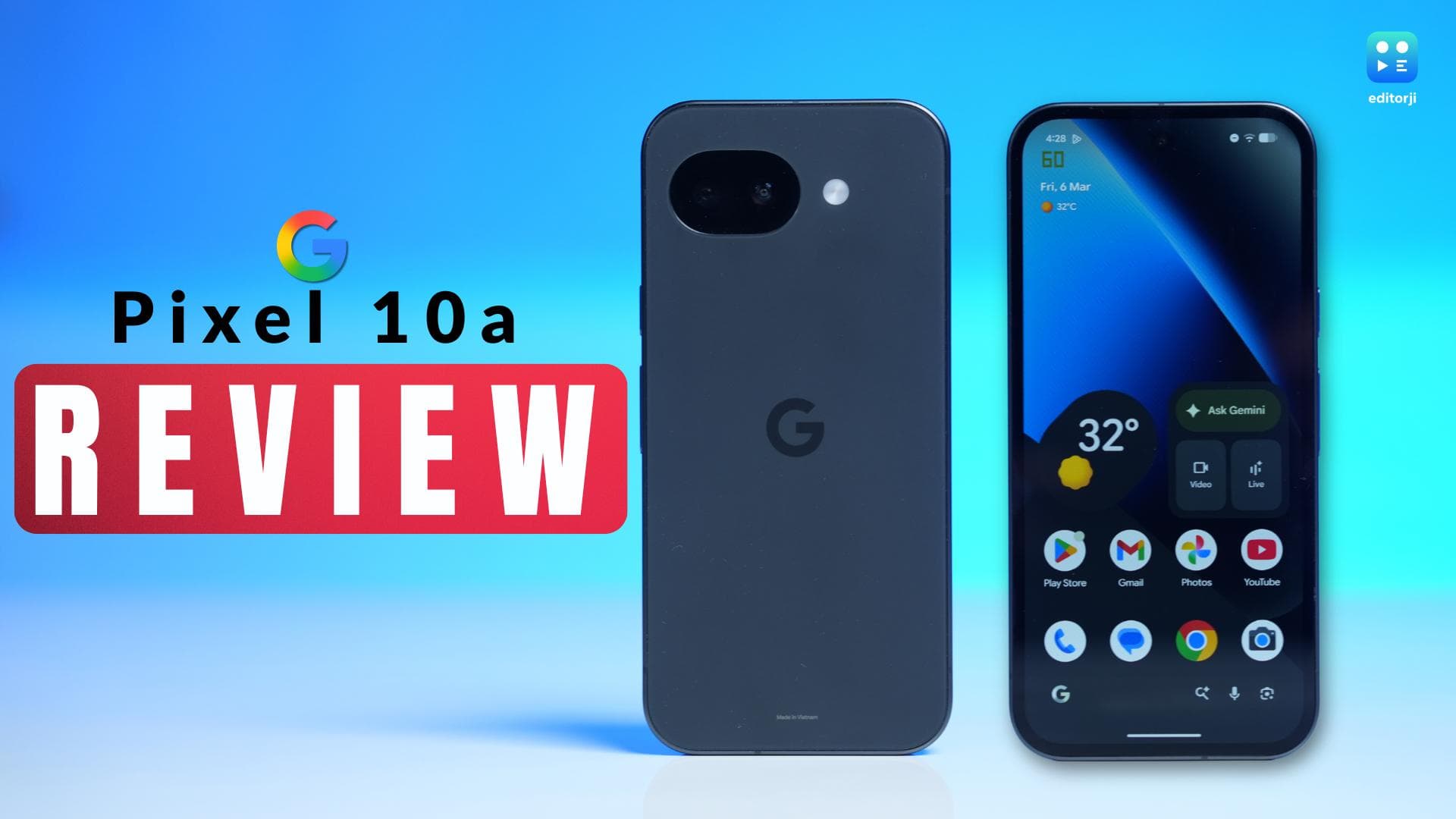
Google is back with its A-series device in the Google Pixel 10a and once again they are challenging the notion of what a "mid-range" phone should be. While the “A-series” is traditionally seen as a scaled-back version of the flagships, this year Google has packed it with premium hardware, including the high-end Tensor G4 chip and a stunning 3,000-nit Actua display.
Priced at ₹49,999 in India for the 8GB RAM and 256GB storage variant, it enters a highly competitive segment with a clear focus on longevity and intelligence. After spending a week with the stealthy Obsidian model, here is a detailed review to understand if this refined AI powerhouse truly justifies its place in your pocket.
Google Pixel 10a review: Unboxing & design
Unboxing the Pixel 10a is a pretty straightforward affair. The packaging is pretty clean and straightforward, just like any Google device. It keeps things minimal with only the phone, a USB-C to USB-C data cable, and the SIM ejector tool inside. The whole unboxing feels standard for Google, nothing extra or flashy.
The phone itself reminded me a lot of the Pixel 9a the moment I picked it up. If you have used that model, this one matches it in so many ways. It has the same composite matte back with a plastic build and satin aluminum on the side frame.
Google made just a few small changes to the layout this time. The SIM tray moved from the bottom on the 9a to the left side of the frame now. The right side still has the volume and power buttons. At the bottom, you get dual stereo speakers and the USB-C port. The top holds only a noise cancellation microphone.
What really stood out to me,is the camera bump. They got rid of it completely, making it almost flush. You don’t even get the minimal protrusion like before. The back lies perfectly flat now, so the phone sits stable and even when you put it down face up on a table.
The size feels well-balanced and compact in your hand. At 183 grams, it comes across as genuinely lightweight yet premium to hold.
One downside I noticed right away is how the back picks up fingerprints fast. It gets smudged and marked up quickly, so most people will probably want a case. I tested the Obsidian colour, a solid black and grey that looks premium enough. Google also sells it in Berry, Fog, and Lavender if you prefer something else.
All in all, the design sticks close to the previous model but comes off just a bit more refined.
Google Pixel 10a review: Display
It shouldn’t come as a surprise that the Pixel 10a gets a pretty solid display. We have a6.3-inch Actua Display. It feels like a solid upgrade overall. Google opted for a fully flat panel, which lends a sharp, contemporary edge to the design.
But, extremely honest opinion; the noticeable bezels puzzle me on a phone like this. Google points out they are slimmer and more consistent than on the previous model, yet they remain quite conspicuous.
We live in a time where displays have gone edge-to-edge, so Google definitely lags here. It shows up when you stream videos or browse, detracting from the high-end impression.
Still, the display delivers where it counts. It rocks a 20:9 aspect ratio on pOLED tech with a smooth 120Hz refresh rate. That makes flipping through social media or jumping between apps feel effortless and quick. Colour accuracy held up great in my hands-on time, with no complaints there. Vibrancy stayed strong through movies, shows, and photos too.
The under-display optical fingerprint sensor gets the work done. It surprised me with how reliable and fast it performed during testing. Deep down, though, I was wishing for an ultrasonic unit. Many brands have already brought those to this price tier, and it would have felt like the right move.
Next comes the brightness and it steals the show on this panel. It hits a peak of 3,000 nits HDR and 2000 nits of HBM brightness, making text, maps, or notifications crystal clear even in brutal midday sun. I stepped out on bright days and never once strained to see the screen. No squinting needed, which made outdoor use a breeze.
Google also bumped up protection on the Pixel 10a with Corning Gorilla Glass 7i. This represents a big improvement over the Gorilla Glass 3 on prior models. It offers stronger defence against everyday scratches, scuffs, and those accidental drops we all deal with. The added durability gives peace of mind without adding bulk.
Google Pixel 10a review: Camera
Pixel cameras have never been just about specs, but the hardware here sets a familiar baseline. You get a dual rear setup with a 48MP main sensor, 13MP ultrawide, and 13MP selfie cam. The numbers look like a repeat, yet real-world shots proved far more capable during my time with the phone.
Looking over my test photos, skin tones jumped out first. They render so naturally. Take one portrait I snapped of a girl on a rooftop. Her complexion came through lifelike, free from the heavy smoothing you see on other mid-rangers. Highlights stayed balanced, and the white balance often warmed up to a golden-hour glow that gave images real personality. The main lens nails natural bokeh too, pulling subjects forward cleanly without looking fake.
However, the missing telephoto hurts, though. Google's Super Res Zoom, which is what they call it, works well up to about 8x, but beyond that, the AI processing shows. Text holds some sharpness, sure, but faces start to look reconstructed and painterly. It suits close details fine. For far-off subjects, you sense the hardware gap right away.
Night Sight remains a standout for me. I pushed it on a tough rooftop shoot with light spilling everywhere, a usual headache. The 10a tamed it perfectly, pulling sharp details from shadows via heavy AI without overdoing it. Results impressed every time.
Along with that you also get a tonne of AI features dedicated for the camera this time which takes things further. The new Camera Coach taps Gemini for live framing advice, handy for beginners. Honestly, it did not click for me personally. I skipped it most days.
Two features won me over, though. Add Me lets you insert yourself into group shots post-capture, seamless for solo travelers. Auto Best Take swaps in better expressions from extra frames if someone blinks, saving so many retakes.
Selfies hold strong with crisp details and punchy colors, even outdoors in harsh light. Video shines too. Rear cams record steady 4K at 60fps. I loved the speech enhancement on a windy street test. It pulled my voice clear while killing crowd noise. Night clips stayed usable and detailed, making this a steal for budget creators who shoot on the go.
Google Pixel 10a review: Performance
The Pixel 10a runs Google's Tensor G4, borrowed straight from the Pixel 10 flagships, paired with 8GB of RAM. Right off the bat, daily use felt quick and responsive. Apps popped open fast. I jumped between Chrome tabs, Spotify, and messages during my commute—no stutters at all. Exactly the kind of smooth flow you need in a main phone. Plus, that G4 chip lets Gemini Nano AI features process locally, skipping the cloud lag most of the time.
Curious about the raw specs, I fired off the usual benchmarks. AnTuTu landed at 1.3 million—not bad, though no one's rewriting records. Geekbench 6 gave me 1,683 on single-core and 4,321 on multi-core. Then the 3DMark Wild Life Extreme stress test: peak score of 2,677, stability around 77.7 per cent. Solid numbers overall. They prove that the G4 handles real work fine without trying to win synthetic races.
Gaming told a different story. I played BGMI first, and it’s locked at 60 FPS, which is totally playable, but even budget phones do that. Maybe with the future updates, you can expect a higher frame rate playing experience on it though. Call of Duty Mobile however, pushed higher to 120 FPS early on, so clearly, the chip is capable. But man, the heat kicked in quick. The phone was noticeably warm right along the frame after just 15 minutes or so. So the device is fine for casual gaming sessions, but definitely not ideal if you're grinding matches for hours.
Day-to-day stuff never let me down, though. I kept a bunch of apps running in the background while out and about and the phone switched seamlessly every time. For normal users, it's plenty reliable.
Google Pixel 10a review: Software, UI/UX & AI features
This is the area where the Pixel 10a pulls ahead of rivals. It comes out of the box with Android 16 and zero bloatware, giving that clean premium feel from the first boot.
The stock interface shines with Google's touch: swipes and animations snap along nicely, no delays anywhere. As a first-party Google phone, it always gets new Android updates ahead of everyone else.
The big draw is seven years of OS and security patches, taking support through 2033. For buyers wanting a phone that lasts, this seals the deal. Google doubles down on AI too, prepping the device for years of smart features.
Gemini 3 integration stands tall, handling multimodal chats where you talk about your screen or point the camera for instant advice.
In fact, I tried Gemini Live on a walk to jot review notes for the article. The back-and-forth felt genuinely conversational. You could cut in mid-sentence to switch topics, and it kept up without missing a beat.
Outside camera tricks like Add Me and Best Take, everyday tools are genuinely useful and impressive. Now, I can’t explain all of them here, because there are too many of them .
But, tools like ‘The AI Weather Report’ spits out a quick written forecast summary, Circle to Search pulls facts on anything you circle, Call Assist keeps delivering: Hold for Me waits through elevator music, Call Screen kills spam dead. These alone make Pixels worth it.
Google Pixel 10a review: Battery and charging
Smaller Pixel phones have not always been known for great battery life, but the Pixel 10a feels like Google finally taking that criticism seriously. The phone packs a 5100mAh battery. On paper that might look modest, especially when some rivals are now pushing 6500mAh cells, but real-world usage tells a more reassuring story.
Google claims up to 30 hours of mixed use, and in my testing the number was surprisingly realistic. I did not quite hit the full 30-hour mark, but the claim certainly does not feel exaggerated. For most users, the Pixel 10a comfortably lasts a full day without any battery anxiety.
Of course, how you use the phone matters. When the Tensor G4 is pushed hard with extended gaming sessions at high frame rates or long stretches of 4K60 video recording, the battery drains noticeably faster. That is fairly typical behaviour for a compact phone.
Charging has also seen a small but welcome upgrade. Wired charging now goes up to 30W, compared to 27W on the previous generation. The Pixel 10a also supports 10W wireless charging.
In my own usage, the phone held up well through a typical day. A mix of emails in the morning, social media through the afternoon, and some streaming in the evening left about 25 per cent battery by bedtime. On another day with GPS navigation, calls, and regular use, the battery dropped to around 15 per cent after roughly 11 hours. Gaming does take a bigger toll, obviously.
Overall, the Pixel 10a delivers dependable battery life. It may not chase the biggest battery numbers in the segment, but in day-to-day use it proves reliable enough to get through a full day without stress.
Google Pixel 10a review: Should you buy it?
The Pixel 10a is a rare device that doesn't feel like a compromise. By packing the Tensor G4, a 3,000-nit display, and a 7-year support window into a more affordable chassis, Google has created one of the best "value" phones on the market, if not the best.
If you are coming from a Pixel 8a, the leap in display quality and AI capability is massive. Even for Pixel 9a users, although I felt only slight differences between the two.
But, things like the addition of Macro Focus, faster charging, and a much more durable design makes this a worthy upgrade. If you want the smartest phone in the room without the "Pro" tax, the Pixel 10a is an easy recommendation. It’s smart, it’s durable, and in Obsidian, it looks fantastic.